# remobi.app: Don't change your terminal workflow for mobile
Connor Adams
AI Engineer Europe 2026
[Talk page](https://ai.engineer/talks/5192csoTkVo-remobi-app-dont-change-your-terminal-workflow) · [Video](https://www.youtube.com/watch?v=5192csoTkVo)
## Remobi: take your terminal workflow onto your phone
Connor Adams demonstrates how Remobi brings an existing tmux workspace to a phone, preserving custom agent controls, code review tools, and the responsibility to secure remote access.
Familiarity with a shell, Git diffs, and terminal coding agents will help; tmux’s workspace structure is introduced along the way.
### Do the agents need you?
[0:28](https://www.youtube.com/watch?v=5192csoTkVo&t=28s)
You are out with friends or family, but the coding agents are still running. Are they making progress? Do they need steering? Connor Adams describes the compulsion to check—and his ambivalence about making that easier. [Remobi](https://github.com/connorads/remobi#readme) grows out of that tension: if you are going to reach for your phone, you should be able to reach the workflow you already use.
There are already mobile agent apps. Adams jokes that his own urge to build another is a case of “AI psychosis,” but he also has specific objections to the available choices. He describes [Happy](https://github.com/slopus/happy) as a native mobile interface for **Claude Code**, limited to that agent, with a relay server he personally does not trust. That comparison belongs to the recording: Happy’s current README supports Codex too and describes end-to-end encryption; Adams’s distrust is not a demonstrated vulnerability.
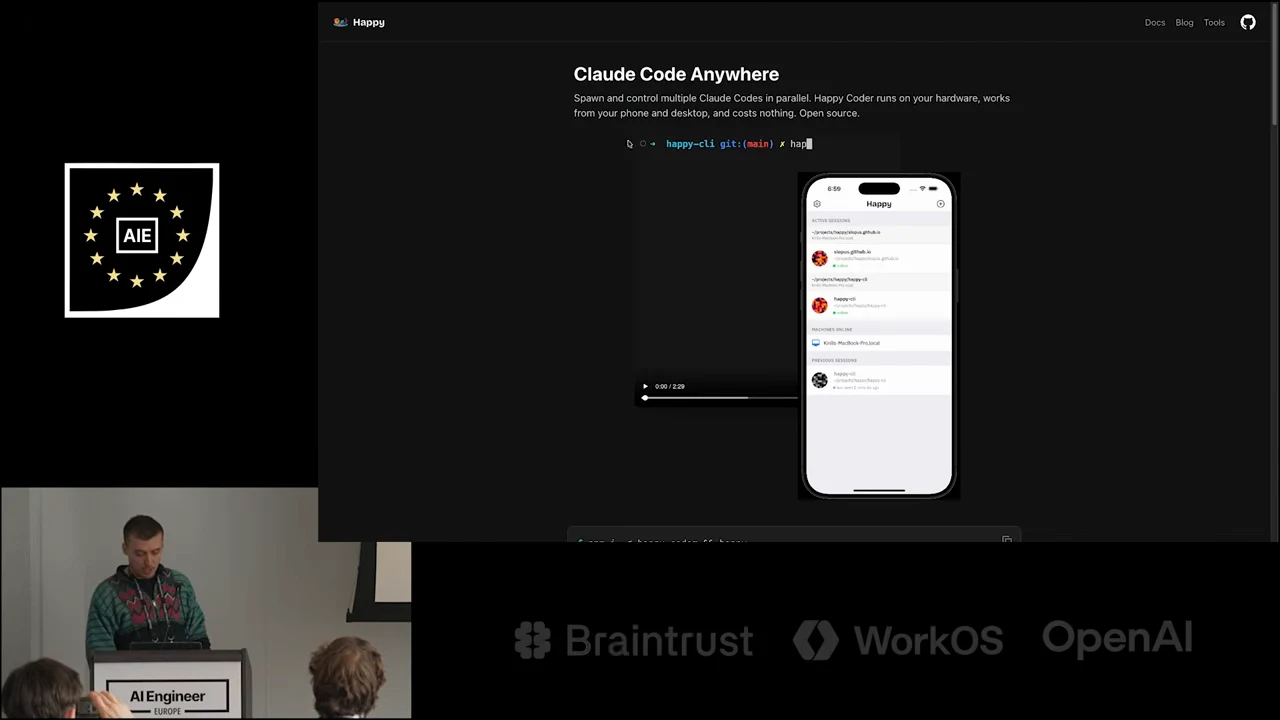
Happy’s “Claude Code Anywhere” page pairs a terminal demonstration with a phone interface.
The other routes each introduce a different kind of friction:
| Route described in the talk | Friction for Adams’s workflow |
| --- | --- |
| Built-in Claude Code mobile handoff | Requires an explicit transfer; does not cover **Codex** or **Pi** in his account |
| General-purpose phone terminal | Requires SSH-key setup and usable touch controls |
| Existing terminal customizations | Need to remain accessible from the phone |
The last point becomes the organizing requirement. Adams already has a workflow built around [tmux](https://github.com/tmux/tmux/wiki), and wants mobile access to preserve it.
### Build the workspace in the terminal
[2:16](https://www.youtube.com/watch?v=5192csoTkVo&t=136s)
Adams previously worked primarily in VS Code. His terminal setup now lives on a remote development machine that he can reach over SSH, giving him the same tools wherever he connects. Before showing the phone, he opens that desktop workspace: four coding agents share a terminal, arranged in separate panes.
**tmux supplies the workspace structure.** Panes divide a window; multiple windows provide separate views, with tabs along the bottom. The status bar is configurable too: Adams uses it for CPU usage and other machine information, with shortcuts that open additional status views. A minimal shell example of the pane-and-window structure is:
```bash
# Create a workspace with two side-by-side panes.
tmux new-session -d -s work -n agents
tmux split-window -h -t work:agents
# Add a separate window, then enter the workspace.
tmux new-window -t work -n tools
tmux attach-session -t work
```
The names `work`, `agents`, and `tools` are example choices; the useful structure is a session containing windows, each of which can contain panes.
Custom commands extend that structure. Adams opens a launcher that offers a choice of agent counts, considers sixteen, and selects four. This is a demonstration of configurable workspace creation, not a throughput measurement. He says he generated the configuration with AI despite not knowing how to implement all of it himself: describe the desired interaction, then have the agent produce the tmux configuration.
He acknowledges apps such as [Conductor](https://www.conductor.build/docs), but prefers to own his workflow while experimenting with how to manage coding agents. The terminal gives him somewhere to put those experiments without first committing to a larger application’s interaction model.
### Keep review and maintenance close to the agents
[4:05](https://www.youtube.com/watch?v=5192csoTkVo&t=245s)
Once Claude Code finishes a change, the next task is to inspect it. Adams presses a shortcut to open [Lazygit](https://github.com/jesseduffield/lazygit) in a terminal window, where he can navigate the repository and scroll through changes. Code review remains part of the same workspace as the agent that produced the code.
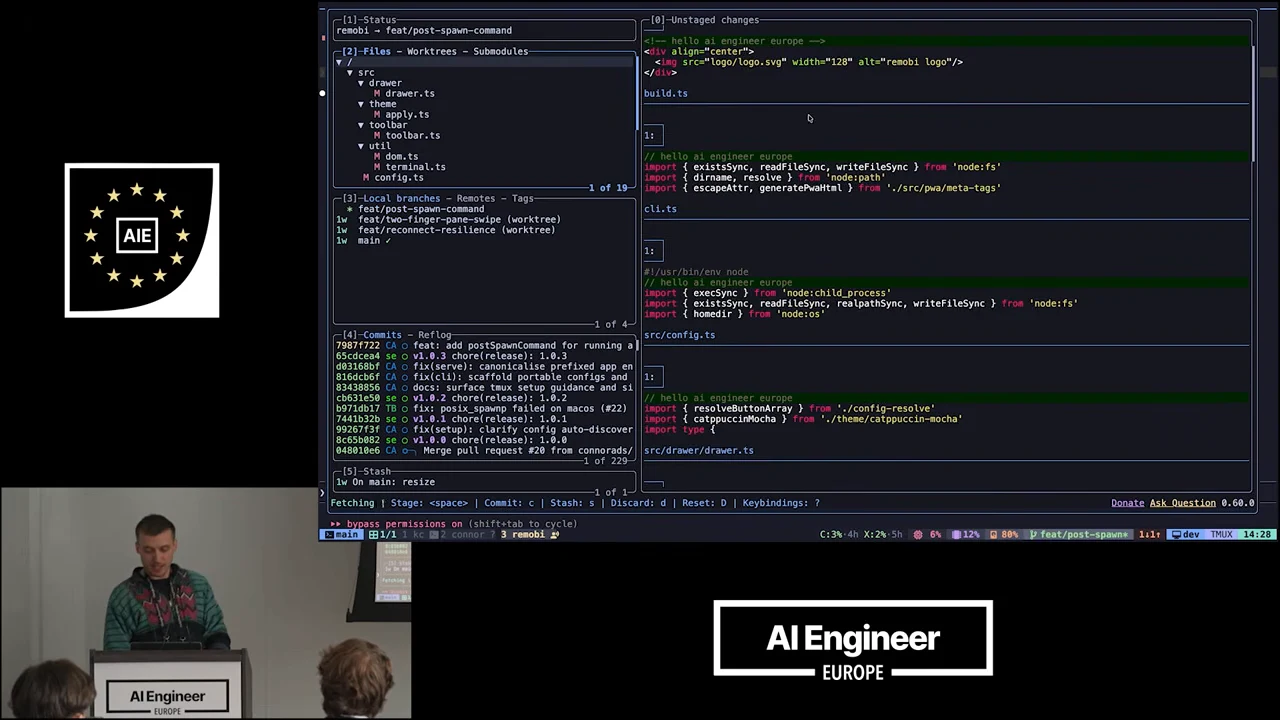
Lazygit displays repository navigation alongside code changes in the terminal.
He then opens another scrollable diff view, called [Critique](https://github.com/remorses/critique), to make the same point: the workflow includes checking changes before committing them. These tools give the agent’s output somewhere to go besides directly into a commit.
The custom tools also cover local maintenance. A development server will not start because a port is occupied; Adams’s utility reveals an agent browser process using it and lets him kill that process. Small, frequently needed operations can become terminal shortcuts alongside agent management and Git review. He undercuts the productivity story with a joke: all this customization can still leave you shipping nothing that users actually use.
### Open the same workspace on a phone
[5:19](https://www.youtube.com/watch?v=5192csoTkVo&t=319s)
With those customizations in place, Adams switches to his phone. Remobi is a **progressive web app**, which he describes as working on iOS and Android, backed by a server running on his machine. He mentions a Pi version, then selects the machine used in the desktop demonstration. The phone opens the workspace where he left it.
The first interaction exposes some roughness: a scrollback-related shrinking behavior does not work as expected, which Adams attributes to switching views. He then moves through the controls that make the existing workflow usable on a touchscreen:
- **Agent mode:** a `Shift+Tab` control switches the demonstrated agent into plan mode.
- **Git review:** a dedicated control opens the Git interface.
- **Diff inspection:** another opens Critique, with gestures for scrolling through the view.
These controls make terminal actions available without requiring every keyboard combination to be entered through the phone’s keyboard.
Adams is blunt about the appearance: he considers it minimally functional, not polished. The pane gestures are the practical part. Double-clicking zooms into a pane; he tries scrolling one with no content to scroll, moves to another, and demonstrates scrolling and zooming back out. The aim is to retain the multi-pane workspace while making an individual pane usable on a small screen. **The phone adapts to the workflow already built in tmux.**
### Adapt the touchscreen controls to your setup
[6:50](https://www.youtube.com/watch?v=5192csoTkVo&t=410s)
Remobi is open source. Adams introduces its shell-script installation path with sarcasm about the wisdom of copying arbitrary commands into a terminal. The guided setup installs a skill that helps configure tmux if you do not already have it. For an existing tmux setup, it turns your bindings into controls for Remobi’s touchscreen interface. The setup therefore accommodates both a new workspace and one with established custom commands.
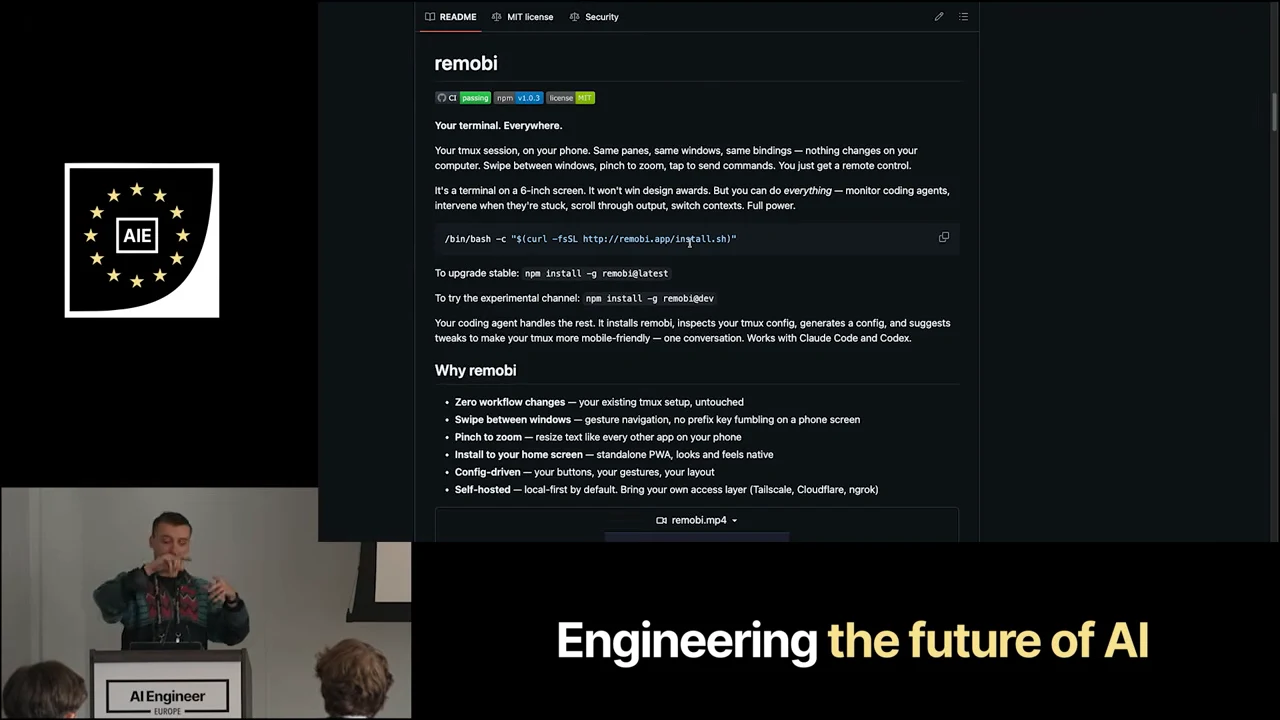
The Remobi README shows installation commands and configurable terminal controls.
The guided script is optional: Adams also describes installing the skill and npm package directly. He closes the installation walkthrough by asking for GitHub stars, even from people who do not plan to use the app.
### Session access and the security boundary
[7:54](https://www.youtube.com/watch?v=5192csoTkVo&t=474s)
The audience questions fill in two missing pieces. First, is remote control itself a tmux feature? Adams separates the responsibilities: tmux provides the panes and workspace, while Remobi calls tmux and takes the user straight into the session. The demonstrated setup hides that session-entry step rather than asking the phone user to manage it each time.
The second question is how the phone communicates with the machine. Remobi is a website accessed over the network. Adams uses [Tailscale](https://tailscale.com/docs/features/tailscale-serve), and names [Cloudflare Tunnels](https://developers.cloudflare.com/cloudflare-one/access-controls/applications/http-apps/self-hosted-public-app/) and ngrok as alternatives. His central qualification is that security depends on how that access is configured. **Connectivity and authorization are separate responsibilities:** providing a route to a terminal does not, by itself, establish who may use it.
That distinction matters because this interface controls a real development machine. Adams warns that putting the service directly on the public internet means “you've pwned your own computer.” An audience member then asks whether Tailscale is the default setup, explaining that otherwise they would be worried. Adams explicitly confirms that it is. The convenience of reaching the existing session from anywhere ends at this boundary: access to the phone interface must remain controlled access to the machine.
## Resources
- [Remobi](https://github.com/connorads/remobi#readme) — Source, installation instructions and configuration for a mobile terminal PWA, including its security model.
- [tmux documentation](https://github.com/tmux/tmux/wiki) — Official guides for persistent terminal sessions, multiplexing and configuration.
- [Lazygit](https://github.com/jesseduffield/lazygit) — A terminal interface for inspecting and managing Git changes.
- [Critique](https://github.com/remorses/critique) — A terminal diff viewer with commands for reviewing working-tree, staged and committed changes.
- [Happy — Claude Code and Codex mobile client](https://github.com/slopus/happy) — Current mobile and web client supporting Claude Code and Codex with documented encrypted synchronization.
- [Tailscale Serve](https://tailscale.com/docs/features/tailscale-serve) — Share a local service within a tailnet using HTTPS and network access rules.
- [Protect a self-hosted application with Cloudflare Access](https://developers.cloudflare.com/cloudflare-one/access-controls/applications/http-apps/self-hosted-public-app/) — Configure authentication, access policies and origin protection for an application published through Cloudflare.
## Slides
### AI Engineer Europe
The AI Engineer Europe logo opens the recording.
[0:00](https://www.youtube.com/watch?v=5192csoTkVo&t=0s) [AI Engineer Europe logo on a black background.](https://assets.ai.engineer/sites/aiecode2025/sha256/aab59c7da120f8504a96c9b8622254406bbff88706e2388a912d6dcc744c1118.webp)
AI Engineer
EUROPE
### Presenting sponsor
Google DeepMind is the presenting sponsor.
[0:05](https://www.youtube.com/watch?v=5192csoTkVo&t=5s) [Google DeepMind presenting sponsor card.](https://assets.ai.engineer/sites/aiecode2025/sha256/22e8cb940ef752894fb0f47ce4cfbb7a04b212fd252bdf1347f3f5879fa393f3.webp)
PRESENTING SPONSOR
Google DeepMind
### Platinum sponsors
Braintrust, WorkOS and OpenAI are the platinum sponsors.
[0:10](https://www.youtube.com/watch?v=5192csoTkVo&t=10s) [Braintrust, WorkOS, and OpenAI platinum sponsor logos.](https://assets.ai.engineer/sites/aiecode2025/sha256/cb07bd809920405f0c6c0e1a018ad6ca9b4cf012e6a1d4692f53bdc38e061cee.webp)
PLATINUM SPONSORS
Braintrust
WorkOS
OpenAI
### Remobi README
Remobi’s README presents a phone as a remote control for an existing tmux session, retaining its panes, windows and bindings while adding touch gestures for navigation and commands.
[0:37](https://www.youtube.com/watch?v=5192csoTkVo&t=37s) [A Remobi README describes accessing a tmux session from a phone, alongside the presenter.](https://assets.ai.engineer/sites/aiecode2025/sha256/07b3f0d65647a904817aab3a224f17b6f8ed802ac5e51d90ed2168bb2c03bb5f.webp)
remobi
CI passing npm v1.0.3 license MIT
Your terminal. Everywhere.
Your tmux session, on your phone. Same panes, same windows, same bindings — nothing changes on your computer. Swipe between windows, pinch to zoom, tap to send commands. You just get a remote control.
It's a terminal on a 6-inch screen. It won't win design awards. But you can do everything — monitor coding agents, intervene when they're stuck, scroll through output, switch contexts. Full power.
/bin/bash -c "$(curl -fsSL http://remobi.app/install.sh)"
To upgrade stable: npm install -g remobi@latest
To try the experimental channel: npm install -g remobi@dev
Your coding agent handles the rest. It installs remobi, inspects your tmux config, generates a config, and suggests tweaks to make your tmux more mobile-friendly — one conversation. Works with Claude Code and Codex.
Why remobi
• Zero workflow changes — your existing tmux setup, untouched
• Swipe between windows — gesture navigation, no prefix key fumbling on a phone screen
• Pinch to zoom — resize text like every other app on your phone
Interface text:
README MIT license Security
AIE
AI Engineer EUROPE
Google DeepMind
### Remobi README
Remobi brings an existing tmux session to a phone, retaining its panes, windows and bindings. The README describes touch navigation and coding-agent-assisted setup.
[0:48](https://www.youtube.com/watch?v=5192csoTkVo&t=48s) [The Remobi README describes mobile access to a tmux session; the presenter appears below.](https://assets.ai.engineer/sites/aiecode2025/sha256/7e4c6da5163ab53107b0327397f6658d6e8fcf616426d40217aec6e09963bddf.webp)
remobi
CI passing · npm v1.0.3 · license MIT
Your terminal. Everywhere.
Your tmux session, on your phone. Same panes, same windows, same bindings — nothing changes on your computer. Swipe between windows, pinch to zoom, tap to send commands. You just get a remote control.
It's a terminal on a 6-inch screen. It won't win design awards. But you can do everything — monitor coding agents, intervene when they're stuck, scroll through output, switch contexts. Full power.
/bin/bash -c "$(curl -fsSL http://remobi.app/install.sh)"
To upgrade stable: npm install -g remobi@latest
To try the experimental channel: npm install -g remobi@dev
Your coding agent handles the rest. It installs remobi, inspects your tmux config, generates a config, and suggests tweaks to make your tmux more mobile-friendly — one conversation. Works with Claude Code and Codex.
Why remobi
• Zero workflow changes — your existing tmux setup, untouched
• Swipe between windows — gesture navigation, no prefix key fumbling on a phone screen
• [illegible] — resize text like every other app on your phone
Interface text:
README · MIT license · Security
AIE
AI Engineer EUROPE
Engineering the future of AI
https://github.com/connorads/remobi/blob/main/logo/logo.svg
[1:05](https://www.youtube.com/watch?v=5192csoTkVo&t=65s) [The remobi README describes controlling a tmux session from a phone.](https://assets.ai.engineer/sites/aiecode2025/sha256/cd80208ce79cdc2b6d858ef4a9d0d1917e7bb9a2f15f012856a87a504fb43f7e.webp)
remobi
CI passing · npm v1.0.3 · license MIT
Your terminal. Everywhere.
Your tmux session, on your phone. Same panes, same windows, same bindings — nothing changes on your computer. Swipe between windows, pinch to zoom, tap to send commands. You just get a remote control.
It's a terminal on a 6-inch screen. It won't win design awards. But you can do everything — monitor coding agents, intervene when they're stuck, scroll through output, switch contexts. Full power.
/bin/bash -c "$(curl -fsSL http://remobi.app/install.sh)"
To upgrade stable: npm install -g remobi@latest
To try the experimental channel: npm install -g remobi@dev
Your coding agent handles the rest. It installs remobi, inspects your tmux config, generates a config, and suggests tweaks to make your tmux more mobile-friendly — one conversation. Works with Claude Code and Codex.
Why remobi
• Zero workflow changes — your existing tmux setup, untouched
• Swipe between windows — gesture navigation, no prefix key fumbling on a phone screen
• [illegible] — resize text like every other app on your phone
Interface text:
README · MIT license · Security
AIE
AI Engineer EUROPE
Braintrust · WorkOS · OpenAI
https://github.com/connorads/remobi/blob/main/logo/logo.svg
### Claude Code Remote Control
Claude Code Remote Control lets users continue a local session on a phone or browser. The speaker notes that the handoff is manual and limited to Claude Code.
[1:33](https://www.youtube.com/watch?v=5192csoTkVo&t=93s) [Claude Code documentation explains continuing local sessions from another device.](https://assets.ai.engineer/sites/aiecode2025/sha256/5a104c03521d1a3046856b7c934f0230dcc6d69fa6815106ccf535944c6ff909.webp)
PLATFORMS AND INTEGRATIONS
Continue local sessions from any device with Remote Control
Continue a local Claude Code session from your phone, tablet, or any browser using Remote Control. Works with claude.ai/code and the Claude mobile app.
Remote Control is available on all plans. On Team and Enterprise, it is off by default until an admin enables the Remote Control toggle in Claude Code admin settings.
Remote Control connects claude.ai/code or the Claude app for iOS and Android to a Claude Code session running on your machine. Start a task at your desk, then pick it up from your phone on the couch or a browser on another computer.
When you start a Remote Control session on your machine, Claude keeps running locally the entire time, so nothing moves to the cloud. With Remote Control you can:
• Use your full local environment remotely: your filesystem, MCP servers, tools, and project configuration all stay available
• Work from both surfaces at once: the conversation stays in sync across all connected devices, so you can send messages from your terminal, browser, and phone interchangeably
• Survive interruptions: if your laptop sleeps or your network drops, the session reconnects automatically when your machine comes back online
Unlike Claude Code on the web, which runs on cloud infrastructure, Remote Control sessions run directly on your machine and interact with your local filesystem. The web and mobile interfaces are just a window into that local session.
Remote Control requires Claude Code v2.1.51 or later. Check your version with claude --version.
Interface text:
Claude Code Docs
English
Search...
Ask AI
Claude Developer Platform
Claude Code on the Web
Getting started
Build with Claude Code
Deployment
Administration
Configuration
Reference
Agent SDK
What's New
Resources
Getting started
Overview
Quickstart
Changelog
Core concepts
How Claude Code works
Extend Claude Code
Explore the .claude directory
Explore the context window
Use Claude Code
Store instructions and memories
Permission modes
Common workflows
Best practices
Platforms and integrations
Overview
Remote Control
Claude Code on the web
Claude Code on desktop
Chrome extension (beta)
Computer use (preview)
Visual Studio Code
Copy page
On this page
Requirements
Start a Remote Control session
Connect from another device
Enable Remote Control for all sessions
Connection and security
Remote Control vs Claude Code on the web
Limitations
Troubleshooting
“Remote Control requires a claude.ai subscription”
“Remote Control requires a full-scope login token”
“Unable to determine your organization for Remote Control eligibility”
“Remote Control is not yet enabled for your account”
“Remote Control is disabled by your organization's policy”
“Remote credentials fetch failed”
Choose the right approach
Related resources
Ask a question...
AIE
AI Engineer EUROPE
### Termius for Android
The speaker presents Termius as a phone terminal option, then flags SSH key setup and touch controls for existing tmux workflows as frustrations.
[1:54](https://www.youtube.com/watch?v=5192csoTkVo&t=114s) [Termius download page for Android with a phone terminal preview.](https://assets.ai.engineer/sites/aiecode2025/sha256/b75cc7b7494e7739af0964a5a3db5d07f604a9b353883e0bad19f7711914a41c.webp)
Download Termius
for Android
GET IT ON Google Play
Phone terminal preview: [illegible]
Interface text:
termius
Product
Security
Pricing
Enterprise
Log in
Sign Up
AIE
AI Engineer EUROPE
### Return to remobi
The remobi README describes controlling an existing tmux session from a phone: swipe between windows, pinch to zoom, and send commands while keeping the same panes and bindings.
[2:15](https://www.youtube.com/watch?v=5192csoTkVo&t=135s) [The remobi README describes mobile access to an existing tmux session.](https://assets.ai.engineer/sites/aiecode2025/sha256/1634a1a6e6a649e68afa260e674a1b283c9e7aedafc75a91c6b6d7cf8076c8cb.webp)
remobi
CI passing · npm v1.0.3 · license MIT
Your terminal. Everywhere.
Your tmux session, on your phone. Same panes, same windows, same bindings — nothing changes on your computer. Swipe between windows, pinch to zoom, tap to send commands. You just get a remote control.
It's a terminal on a 6-inch screen. It won't win design awards. But you can do everything — monitor coding agents, intervene when they're stuck, scroll through output, switch contexts. Full power.
/bin/bash -c "$(curl -fsSL http://remobi.app/install.sh)"
To upgrade stable: npm install -g remobi@latest
To try the experimental channel: npm install -g remobi@dev
Your coding agent handles the rest. It installs remobi, inspects your tmux config, generates a config, and suggests tweaks to make your tmux more mobile-friendly — one conversation. Works with Claude Code and Codex.
Why remobi
• Zero workflow changes — your existing tmux setup, untouched
• Swipe between windows — gesture navigation, no prefix key fumbling on a phone screen
• Pinch to zoom — resize text like every other app on your phone
Interface text:
README · MIT license · Security
AIE
AI Engineer
AI Engineer EUROPE
### Four coding agents in tmux
The presenter shows four coding agents side by side in tmux. Its panes share one terminal, while tabs along the bottom let him switch between windows.
[2:44](https://www.youtube.com/watch?v=5192csoTkVo&t=164s) [A terminal split into four panes showing different coding-agent interfaces.](https://assets.ai.engineer/sites/aiecode2025/sha256/8068b2a88d44ec8585626506f68473101832d7fc6c017cba6ce4ac2f38b11511.webp)
OpenCode
Ask anything... “What is the tech stack of this project?”
Build GLM-5 OpenCode Go
1 mcp server
Tab agents
Ctrl+P commands
Tip Press Ctrl+X Right/Left to
Claude Code v2.1.92
Opus 4.6 (1M context)
Claude Max
/home/connor
/clear
(no content)
~/.pi/agent/skills/summon/SKILL.md
~/.pi/agent/skills/task-loop/SKILL.md
~/.pi/agent/skills/task-plan/SKILL.md
~/.pi/agent/skills/test-coverage/SKILL.md
~/.pi/agent/skills/text-to-speech/SKILL.md
~/.pi/agent/skills/tmux/SKILL.md
~/.pi/agent/skills/vercel-composition-patterns/SKILL.md
~/.pi/agent/skills/vercel-react-best-practices/SKILL.md
~/.pi/agent/skills/vercel-react-native-skills/SKILL.md
~/.pi/agent/skills/vhs/SKILL.md
~/.pi/agent/skills/web-animation-design/SKILL.md
~/.pi/agent/skills/web-design-guidelines/SKILL.md
~/.pi/agent/skills/youtube-transcript/SKILL.md
[Extensions]
user
npm:pi-web-providers@2.2.0
index.js
Update Available
New version 0.66.1 is available. Run:
npm install -g @mariozechner/pi-coding-agent
Changelog:
https://github.com/badlogic/pi-mono/blob/main/packages/coding-agent/CHANGELOG.md
Codex could not find system bubblewrap on PATH. Please install bubblewrap with your package manager. Codex will use the vendored bubblewrap in the meantime.
OpenAI Codex (v0.118.0)
model: gpt-5.4 medium /model to change
directory: ~
Tip: Use /permissions to control when Codex asks for confirmation.
> hi codex
Interface text:
1 MCP /status 1.3.7
Update ava...
Opus 4.6 (1M context)
plan mode on (shift+tab to cycle)
gpt-5.4 medium · 100% left · ~
main 1 kc 2 connor 3 remobi
AIE
Engineering the future of AI
AI Engineer EUROPE
### Claude Code in a tmux window
The presenter switches to a Claude Code window in tmux. The bottom bar shows window tabs and customized status information, including CPU usage.
[3:06](https://www.youtube.com/watch?v=5192csoTkVo&t=186s) [A single Claude Code terminal window with a tmux status bar.](https://assets.ai.engineer/sites/aiecode2025/sha256/b441a336150c8637d11a4d99059884d9c10cf6199a5ad43c3ae9668547d58c5a.webp)
Engineering the future of AI
AI Engineer
EUROPE
Interface text:
1 "* Claude Code"
Claude Code v2.1.92
Opus 4.6 (1M context) · Claude Max
~/git/remobi
Update available! Run: your package manager update command
~/git/remobi on feat/post-spawn-command | Opus 4.6 (1M context)
» bypass permissions on (shift+tab to cycle)
main 1/1 1 kc 2 connor 3 remobi
C:3%·4h X:1%·5h 16% 15% 80% feat/post-spawn* dev TMUX 14:27
### Terminal system monitor
The presenter opens a terminal monitor with a key press, showing CPU, memory, disk, network and process activity. He says he can set up custom key commands.
[3:18](https://www.youtube.com/watch?v=5192csoTkVo&t=198s) [A terminal dashboard showing CPU, memory, disk, network and process information.](https://assets.ai.engineer/sites/aiecode2025/sha256/ae603be065a242a8e4d68d7d95fcca87c1a0dbbf3d540ab538643bac046a3972.webp)
CPU — 1.68 1.41 1.34
Y-axis ticks: 100%, 0%
Timeline: 60s, 0s
CPU Use
All
AVG 19%
CPU0 26%
CPU1 82%
CPU2 7%
CPU3 8%
CPU4 9%
CPU5 8%
CPU6 6%
CPU7 8%
Memory
Y-axis ticks: 100%, 0%
Timeline: 60s, 0s
RAM: 16% 2.5GiB/15.2GiB
SWP: 11% 1.8GiB/16.0GiB
Temperatures
No data
Disks
Disk(d) Mount(m) Used(u) Free(n) Total(t) Used%(p) R/s(r)
/dev/sda1 / 123GB 31GB 161GB 79.9% 56KB/s
/dev/sda15 /boot/efi 153KB 264MB 264MB 0.1% 0B/s
Network
Y-axis ticks: 20.8, 13.8, 6.9, 0Mb
Timeline: 60s, 0s
RX: 159.0Kb/s All: 126.6GB
TX: 1.3Mb/s All: 126.9GB
Processes
PID(p) Name(n) CPU%(c) Mem%(m) R/s W/s T.Read
3053640 rustc 12.7% 6.0% 0B/s 23MB/s 0B
2629091 claude 0.7% 1.6% 0B/s 0B/s 247MB
2973276 claude 0.7% 2.3% 0B/s 0B/s 81MB
2719 tmux: server 0.5% 0.7% 0B/s 0B/s 187.1GB
1126 tailscaled 0.2% 0.3% 0B/s 0B/s 0B
3054211 btm 0.2% 0.0% 0B/s 0B/s 4MB
3054362 sh 0.2% 0.0% 0B/s 0B/s 0B
2080 cloudflared 0.1% 0.1% 0B/s 0B/s 0B
2604683 opencode 0.1% 0.9% 0B/s 0B/s 167MB
1 systemd 0.0% 0.1% 0B/s 0B/s 0B
Interface text:
AIE
Engineering the future of AI
AI Engineer EUROPE
>> bypass permissions on (shift+tab to cycle)
main 1/1 1 kc 2 connor 3 remobi
C:3%·4h X:1%·5h 19% 15% 80% feat/post-spawn* dev TMUX 14:27
### Splitting the terminal into four panes
A custom key command splits the tmux window into four vertical panes: Claude Code occupies the first, while the other three show shell prompts.
[3:33](https://www.youtube.com/watch?v=5192csoTkVo&t=213s) [A tmux window split into four vertical panes, with Claude Code in the first pane.](https://assets.ai.engineer/sites/aiecode2025/sha256/2a54f7ed0e60eb43c066f860cd580aa5c82069e8ad6041f258629efecff42131.webp)
Interface text:
1 "* Claude Code"
Claude Code v2.1.92
Opus 4.6 (1M context)
Claude Max
~/git/remobi
connor@dev ~/git/remobi
connor@dev ~/git/remobi 14:27:43
connor@dev ~/git/remobi 14:27:43
Update available! Run: your package man...
~/git/remobi on feat/post-spawn-comman...
>> bypass permissions on (shift+tab to
main 1/4 1 kc 2 connor 3 remobi
C:3%-4h X:2%-5h 29% 16% 80% feat/post-spawn* dev TMUX 14:27
AIE
AI Engineer
EUROPE
### New Claude Code session
A Claude Code session fills the terminal, showing a greeting and response. The presenter sets up a scenario for reviewing a diff after Claude has done some work.
[3:40](https://www.youtube.com/watch?v=5192csoTkVo&t=220s) [A Claude Code session showing a greeting and the assistant's response.](https://assets.ai.engineer/sites/aiecode2025/sha256/733b32bf3df94d5d38bf0ec30636b76d0c8d831a860446548cc66519229f974d.webp)
New coding session
Claude Code v2.1.92
Opus 4.6 (1M context) · Claude Max
~/git/remobi
hello
Hi! What would you like to work on?
Interface text:
Update available! Run: your package manager update command
~/git/remobi on feat/post-spawn-command | Opus 4.6 (1M context) | 40k (4%)
bypass permissions on (shift+tab to cycle)
main 1/1 [illegible] 3 remobi
C:3%·4h X:2%·5h 16% 12% 80% feat/post-spawn* [illegible] dev TMUX 14:28
AIE
AI Engineer EUROPE
### Reviewing changes in lazygit
The speaker opens lazygit in a tmux window to inspect Git files and the unstaged diff after work in Claude Code.
[4:23](https://www.youtube.com/watch?v=5192csoTkVo&t=263s) [A terminal Git interface shows changed files, branches, commits, and code diffs.](https://assets.ai.engineer/sites/aiecode2025/sha256/c8c24e9c8ec9aaf6c74abc7313d16c05f062d13497dc65feca56305a29fa879b.webp)
[1]-Status
remobi → feat/post-spawn-command
[2]-Files - Worktrees - Submodules
/
src
drawer
M drawer.ts
theme
M apply.ts
toolbar
M toolbar.ts
util
M dom.ts
M terminal.ts
M config.ts
1 of 19
[3]-Local branches - Remotes - Tags
* feat/post-spawn-command
1w feat/two-finger-pane-swipe (worktree)
1w feat/reconnect-resilience (worktree)
1w main ✓
1 of 4
[4]-Commits - Reflog
7987f722 CA feat: add postSpawnCommand for running a [illegible]
65cdcea4 se v1.0.3 chore(release): 1.0.3
d03168bf CA fix(serve): canonicalise prefixed app en[illegible]
816dcb6f CA fix(cli): scaffold portable configs and [illegible]
83438856 CA docs: surface tmux setup guidance and si[illegible]
cb631e50 se v1.0.2 chore(release): 1.0.2
b971db17 TB fix: posix_spawnp failed on macos (#22)
7441b32b se v1.0.1 chore(release): 1.0.1
99267f3f CA fix(setup): clarify config auto-discover
8c65b082 se v1.0.0 chore(release): 1.0.0
048010e6 CA Merge pull request #20 from connorads/[illegible]
1 of 229
[5]-Stash
1w On main: resize
1 of 1
[0]-Unstaged changes
README.md
1:

build.ts
1:
// hello ai engineer europe
import { existsSync, readFileSync, writeFileSync } from 'node:fs'
import { dirname, resolve } from 'node:path'
import { escapeAttr, generatePwaHtml } from './src/pwa/meta-tags'
cli.ts
1:
#!/usr/bin/env node
// hello ai engineer europe
import { execSync } from 'node:child_process'
import { existsSync, readFileSync, realpathSync, writeFileSync } from 'node:fs'
import { homedir } from 'node:os'
src/config.ts
1:
// hello ai engineer europe
import { resolveButtonArray } from './config-resolve'
import { catppuccinMocha } from './theme/catppuccin-mocha'
Interface text:
Fetching \ Stage: | Commit: c | Stash: s | Discard: d | Reset: D | Keybindings: ?
Donate Ask Question 0.60.0
bypass permissions on (shift+tab to cycle)
AIE
AI Engineer EUROPE
### Remobi on a phone
The speaker opens a remobi shortcut to reach the same machine’s terminal on his phone. In Claude Code, he demonstrates touch controls for zooming into panes and scrolling.
[5:26](https://www.youtube.com/watch?v=5192csoTkVo&t=326s) [A phone home screen shows an open folder with two remobi shortcuts.](https://assets.ai.engineer/sites/aiecode2025/sha256/de488828c2fb32ef6a7a92a55a31b2ee729faadebeac6bc6763fb4b36316007d.webp)
AIE
Engineering the future of AI
AI Engineer
EUROPE
Interface text:
15:29
100%
Ven. 10 avr.
12°C
Habitudes
Bitwarden
Home
YouTube
Nuki
Slack
remobi dev
remobi rpi5
remobi
Tasks
Agenda
ChatGPT
Claude
Gemini
Perplexity
WhatsApp
Gmail
Citymapper
Maps
[6:23](https://www.youtube.com/watch?v=5192csoTkVo&t=383s) [A phone displays a Claude Code terminal above an on-screen keyboard.](https://assets.ai.engineer/sites/aiecode2025/sha256/fdfa0218513f3ae8f05aedc5a453992dc56d0204fcbe2bd921d36ad70149facc.webp)
AIE
AI Engineer
EUROPE
Interface text:
15:30
100%
Zoom − + ?
Claude Code v2.1.92
Opus 4.6 (1M context) · Claude Max
/home/connor
/clear
└ (no content)
Update ava...
~ | Opus 4.6 (1M context)
plan mode on (shift+tab to cycle)
main [illegible] 2 connor 3 remobi 14:30
GIF
q w e r t y u i o p
a s d f g h j k l
z x c v b n m
?123
EN · FR
### Remobi overview
Remobi puts an existing tmux session on a phone, with gestures for navigation and zoom. Its setup uses a coding agent to adapt the configuration; the speaker says a skill can also help set up tmux and touchscreen bindings.
[7:09](https://www.youtube.com/watch?v=5192csoTkVo&t=429s) [The Remobi README describes a phone interface for tmux and lists its navigation and configuration features.](https://assets.ai.engineer/sites/aiecode2025/sha256/1062cf330bc4f76280a3313cc79267871a63a8b29bb79ef76d96fb4a699b0d4e.webp)
remobi
Your terminal. Everywhere.
Your tmux session, on your phone. Same panes, same windows, same bindings — nothing changes on your computer. Swipe between windows, pinch to zoom, tap to send commands. You just get a remote control.
It's a terminal on a 6-inch screen. It won't win design awards. But you can do everything — monitor coding agents, intervene when they're stuck, scroll through output, switch contexts. Full power.
/bin/bash -c "$(curl -fsSL http://remobi.app/install.sh)"
To upgrade stable: npm install -g remobi@latest
To try the experimental channel: npm install -g remobi@dev
Your coding agent handles the rest. It installs remobi, inspects your tmux config, generates a config, and suggests tweaks to make your tmux more mobile-friendly — one conversation. Works with Claude Code and Codex.
Why remobi
• Zero workflow changes — your existing tmux setup, untouched
• Swipe between windows — gesture navigation, no prefix key fumbling on a phone screen
• Pinch to zoom — resize text like every other app on your phone
• Install to your home screen — standalone PWA, looks and feels native
• Config-driven — your buttons, your gestures, your layout
• Self-hosted — local-first by default. Bring your own access layer (Tailscale, Cloudflare, ngrok)
Interface text:
README
MIT license
Security
CI passing
npm v1.0.3
license MIT
remobi.mp4
AIE
AI Engineer EUROPE
Engineering the future of AI
### Closing QR code
[7:36](https://www.youtube.com/watch?v=5192csoTkVo&t=456s) [A large QR code centered on a dark background.](https://assets.ai.engineer/sites/aiecode2025/sha256/d732ded33246708923f8930eb1649e3011774f9734ce663244d501a3b81bb1e1.webp)
AIE
Braintrust
WorkOS
OpenAI
AI Engineer
EUROPE
## Full transcript
[0:00](https://www.youtube.com/watch?v=5192csoTkVo&t=0s) [upbeat music] Hello everyone.
[0:18](https://www.youtube.com/watch?v=5192csoTkVo&t=18s) Um, so yeah, my name's, my name's Connor Adams, and I'm here to present to you Remobi. A little change of schedule here, so you might, might not be expecting this.
[0:28](https://www.youtube.com/watch?v=5192csoTkVo&t=28s) Um, so who here uses, checks on their agents on their phone?
[0:36](https://www.youtube.com/watch?v=5192csoTkVo&t=36s) Okay. Who here would like to, but doesn't? Okay. Yeah. I- I'm always actually torn about whether or not it's a great idea or not. I'm thinking, I'm out, you know, out and about, may- might even be some nice weather, uh, out with my friends and family, and then I get this sort of compulsion to check on my
[0:54](https://www.youtube.com/watch?v=5192csoTkVo&t=54s) agents. Are they, are they working well? Do I need to steer them? Do they need me? And so, rightly or wrongly, th- there are plenty of apps for it.
[1:02](https://www.youtube.com/watch?v=5192csoTkVo&t=62s) So before I show you mine, why have I built one? Well, one, because I've got AI psychosis, of course, and you just must build apps. But the thing I wanted didn't really exist.
[1:12](https://www.youtube.com/watch?v=5192csoTkVo&t=72s) So there's, there's Claude, uh, there's Happy, which does Claude Code, and it's got a nice native moto- uh, mobile app, but it only works with, uh, Claude Code. And also, it has some relay server that I'm not sure I really trust.
[1:28](https://www.youtube.com/watch?v=5192csoTkVo&t=88s) Um, fine. Uh, what other options do we have? Another Claude Code option. Well, you can use the inbuilt thing and it will, uh, you press a manual handoff, and it will hand off your session to the mobile app.
[1:42](https://www.youtube.com/watch?v=5192csoTkVo&t=102s) That's cool. Um, but it means that you have to manually hand over, and also, it means that you can't use Codex or something else. Or Pi. Um, or there's just-- What about just having a,
[1:56](https://www.youtube.com/watch?v=5192csoTkVo&t=116s) a, like, terminal app for your, um, for your phone? And these are also good. The w- the annoying things I find with it is, like, managing SSH keys and setting all that up.
[2:06](https://www.youtube.com/watch?v=5192csoTkVo&t=126s) Also, having, uh, touch controls and having it work with your existing workflows that you may have, uh, in something like tmux.
[2:16](https://www.youtube.com/watch?v=5192csoTkVo&t=136s) So another question. Tmux users? Got any? Only a, a couple, and that wa- unsure face as well. Okay. So if we don't use tmux, that's fine. So I used to be, I used to be a big VS Code man, and then now I just, maybe 'cause I think it's cool, I use the terminal.
[2:34](https://www.youtube.com/watch?v=5192csoTkVo&t=154s) But also, it's nice because it's a portable setup and I can-- I've got a remote dev machine, I can SSH into it. It's got all my same stuff on it.
[2:41](https://www.youtube.com/watch?v=5192csoTkVo&t=161s) So before we get onto the mobile bit, I will just show you,
[2:46](https://www.youtube.com/watch?v=5192csoTkVo&t=166s) um, tmux. So this is my terminal, and why not have four different coding agents on there at the same time? And so what tmux is, is essentially like a window manager for your terminal, so you're able to have these panes like this, and you're also able to have, um, windows that you can switch between.
[3:06](https://www.youtube.com/watch?v=5192csoTkVo&t=186s) You see the tabs along the bottom. But you can also, like, customize it. It's probably a bit hard to read on the screen, but I've got stuff in the bottom that says, oh, this is the CPU usage and all this sort of stuff.
[3:18](https://www.youtube.com/watch?v=5192csoTkVo&t=198s) Like, I can press buttons, and then I can see, like, how the computer's going or whatever, CPU, blah, blah, blah. Um, and I can, uh, set up all custom key commands.
[3:28](https://www.youtube.com/watch?v=5192csoTkVo&t=208s) So for example, I press this and then how, how agent maxing, how token maxing are you feeling? Do you think you can manage sixteen? Probably not. Four, let's say, and then you just press that, and then it does that.
[3:41](https://www.youtube.com/watch?v=5192csoTkVo&t=221s) And I didn't know how to do any of this, and I probably still don't 'cause obviously I vibed it. It knows how to use tmux. So you just have, like, a vision in your head, like, "I wanna be able to do this."
[3:52](https://www.youtube.com/watch?v=5192csoTkVo&t=232s) And there are probably o- other cool apps that people use, you know, like Conductor and stuff, and I think it's all great, but at this moment, as Mara said, the, the fuck around and find out stage, I'd rather sort of own what I'm doing and find my own workflows for now.
[4:05](https://www.youtube.com/watch?v=5192csoTkVo&t=245s) But we'll see. And so, uh, that's a bit of tmux. But a little bit more of tmux, actually. I'm just-- I should've called my talk Tmux Talk. But, um, so let's say I'm, I, I've done something on Claude Code, and it's done some work, and then I wanna see the diff.
[4:22](https://www.youtube.com/watch?v=5192csoTkVo&t=262s) Well, I can, uh, load up lazygit in a, in a window by just pressing some buttons, and then I can scroll through it, and I can see all my Git stuff.
[4:32](https://www.youtube.com/watch?v=5192csoTkVo&t=272s) Or th- there's other ones. There's a thing called Critique, and then I can scroll through the diff there 'cause we're checking our code, of course, before, uh, we're committing it.
[4:40](https://www.youtube.com/watch?v=5192csoTkVo&t=280s) Um, and other, like, random things is, like, sometimes you have some,
[4:46](https://www.youtube.com/watch?v=5192csoTkVo&t=286s) you have some random port being used and you're like, "Why, why isn't my dev server running? Oh, it's, there's agent browser running on here. Let's kill it." And you can do that, and you can create all these little tools and create your own workflow.
[4:59](https://www.youtube.com/watch?v=5192csoTkVo&t=299s) Um, and then still not ship anything that users use anyway. But anyway, um, the point is you can customize stuff. So that's that, and then from there,
[5:12](https://www.youtube.com/watch?v=5192csoTkVo&t=312s) I've got all my custom workflows that make me incredibly productive, of course. And then I'm like, "Okay,
[5:19](https://www.youtube.com/watch?v=5192csoTkVo&t=319s) now I wanna go and ruin my family time." Now I can do that. So here's my, here's my phone, and I can open up here. So it's a progressive web app, so it works on iOS and Android.
[5:31](https://www.youtube.com/watch?v=5192csoTkVo&t=331s) And you're-- I'm running a server on my machine. And I press, we've got a Pi version, or we got, this is the machine we were just in. Um, and so that's where we were.
[5:41](https://www.youtube.com/watch?v=5192csoTkVo&t=341s) We're exactly there. And it's f- it's, you can, if I scroll back, oh, it doesn't work. It usually shrinks, but it's 'cause I'm switching. Anyway. Um, and so I can do all that same stuff.
[5:51](https://www.youtube.com/watch?v=5192csoTkVo&t=351s) So say I need to put it into plan mode or whatever. There's a little Shift + Tab thing here that I can switch it into plan mode. If I wanna load up Git, I've got a little thing for that.
[6:02](https://www.youtube.com/watch?v=5192csoTkVo&t=362s) If I wanna o- open up the Critique thing, I can scroll. It's all got the ges- all the gesture stuff. Um, and so if we look at this, it's not winning any design awards, right? [laughs]
[6:15](https://www.youtube.com/watch?v=5192csoTkVo&t=375s) It looks like shit. But you can actually ... It's, I'd argue it's, like, it's minimally functional or, or maybe functional. So you can, uh ... I've got, like, a touch ...
[6:26](https://www.youtube.com/watch?v=5192csoTkVo&t=386s) So you can, like, double-click, and it will zoom into each pane, and then you can scroll on the panes or whatever, um, as you please. There's nothing to scroll there.
[6:34](https://www.youtube.com/watch?v=5192csoTkVo&t=394s) We can scroll on this one. So, you know, I can scroll on there or I can zoom in, zoom out. Um, all that stuff. And so, uh, that's, that's basically it.
[6:44](https://www.youtube.com/watch?v=5192csoTkVo&t=404s) So the idea is that you have your workflow. You might like tmux, and if you don't already, you might get into it. And then you can set it up.
[6:50](https://www.youtube.com/watch?v=5192csoTkVo&t=410s) And talking of which, so yeah, it's an open source thing. I'll put a QR code, but it's called Remobi. Um, and so, uh, you know what the best idea is, is when you see a command that just runs a random shell script, you copy and you paste that into your terminal because you know it's gonna lead to
[7:09](https://www.youtube.com/watch?v=5192csoTkVo&t=429s) good results. And so if you do this, you don't have to do that, it will, it will guide you through and it installs a skill that helps you set up tmux if you haven't got it already.
[7:17](https://www.youtube.com/watch?v=5192csoTkVo&t=437s) Or if you've got tmux, it turns it into key bindings that you- for your setup in the little touch screen mode on Remobi, and it just helps you set up.
[7:26](https://www.youtube.com/watch?v=5192csoTkVo&t=446s) But you can just install the skill and install the npm package and have fun. Um, and I think that's basically it. So even if you're not gonna do it, give us a few stars, would you, on the old GitHub?
[7:41](https://www.youtube.com/watch?v=5192csoTkVo&t=461s) Um, and I think, I think that's it. Um,
[7:46](https://www.youtube.com/watch?v=5192csoTkVo&t=466s) thank you very much. [applause]
[7:52](https://www.youtube.com/watch?v=5192csoTkVo&t=472s) Can I ask a question?
[7:53](https://www.youtube.com/watch?v=5192csoTkVo&t=473s) Yeah, yeah, you can.
[7:54](https://www.youtube.com/watch?v=5192csoTkVo&t=474s) Um, how, how do you control tmux remotely? Is it, is that, is that just a feature of tmux? Can I not use-
[8:02](https://www.youtube.com/watch?v=5192csoTkVo&t=482s) Uh, yeah, so, uh, yeah, t- uh, tmux is just the thing that makes it all, like, the panes and stuff. Uh, so you're just jumping. So when you set up Remobi, you basically don't even have to think about it.
[8:12](https://www.youtube.com/watch?v=5192csoTkVo&t=492s) It just run, it just calls tmux, and then you just, like, log straight into your session. So you don't, you don't really have to do anything. Yeah.
[8:21](https://www.youtube.com/watch?v=5192csoTkVo&t=501s) Uh, following up onto his question, what's the communication between the phone and the- Yeah ... It's just a website. I didn't, I didn't touch on this at all, which is very, very key point.
[8:30](https://www.youtube.com/watch?v=5192csoTkVo&t=510s) So yeah, it's just, it's just over the internet. But, so I use Tailscale to do it, but you could use Cloudflare Tunnels, ngrok, whatever you like, and yeah. And security is your concern of that thing.
[8:43](https://www.youtube.com/watch?v=5192csoTkVo&t=523s) Yeah. If you, if you, if you, if you just put it on the public internet, you've pwned your own computer, so.
[8:49](https://www.youtube.com/watch?v=5192csoTkVo&t=529s) Is, is Tailscale the default process of setting that up?
[8:51](https://www.youtube.com/watch?v=5192csoTkVo&t=531s) Yes. Yeah, yeah, yeah. Yeah.
[8:52](https://www.youtube.com/watch?v=5192csoTkVo&t=532s) 'Cause if not, I'd be a little worried.
[8:54](https://www.youtube.com/watch?v=5192csoTkVo&t=534s) Yeah, yeah. Yeah. So, yeah, it's the default thing. Yeah. Yeah, yeah. But,
[8:59](https://www.youtube.com/watch?v=5192csoTkVo&t=539s) well, all right. Thank you very much. [applause] [outro jingle]