# How We Build Effective Agents
Barry Zhang
AI Engineer Summit 2025
[Talk page](https://ai.engineer/talks/D7_ipDqhtwk-effective-ai-agents) · [Video](https://www.youtube.com/watch?v=D7_ipDqhtwk)
## How to Build Effective AI Agents Without Overengineering Them
Barry Zhang explains when autonomous agents are worth their cost, how to construct them around a simple tool-use loop, and why better agent behavior starts with understanding the model’s limited perspective.
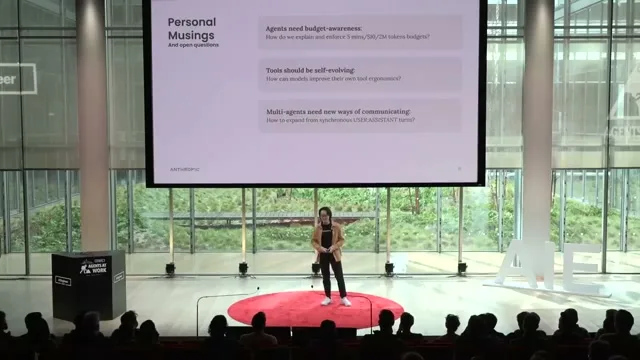
How to Build Effective AI Agents Without Overengineering Them
### Start by asking whether an agent is necessary
[0:17](https://www.youtube.com/watch?v=D7_ipDqhtwk&t=17s)
AI applications can evolve from individual model calls for summarization, classification, and extraction into **workflows** that orchestrate multiple calls through predefined control flows. Those workflows trade additional cost and latency for better performance while preserving explicit control over execution. An **agent** introduces a different operating model: it determines its own trajectory and adjusts its behavior in response to feedback from its environment. Greater agency can increase capability and usefulness, but it also increases cost, latency, and the consequences of mistakes. [0:17](https://www.youtube.com/watch?v=D7_ipDqhtwk&t=17s) [1:18](https://www.youtube.com/watch?v=D7_ipDqhtwk&t=78s)
That distinction makes autonomy an architectural decision rather than a default upgrade. Agents are most appropriate for **complex, valuable tasks** where ambiguity makes the full decision tree difficult to specify in advance. When the possible branches can be mapped explicitly, a workflow allows developers to optimize individual steps, exercise more control, and generally operate more cost-effectively. [2:30](https://www.youtube.com/watch?v=D7_ipDqhtwk&t=150s)
The economics matter because autonomous exploration consumes tokens. Zhang gives a high-volume customer-support example with a per-task budget around $0.10, which he describes as affording roughly 30,000 to 50,000 tokens. Under that constraint, a workflow covering common scenarios can capture most of the available value without paying for unrestricted exploration. [2:30](https://www.youtube.com/watch?v=D7_ipDqhtwk&t=150s) [3:29](https://www.youtube.com/watch?v=D7_ipDqhtwk&t=209s)
Start by asking whether an agent is necessary
- Workflows follow predefined control flows; agents determine their trajectory using environmental feedback.
- Choose agents for complex, ambiguous tasks valuable enough to justify exploratory token costs.
- Prefer explicit workflows when the decision tree is clear or per-task budgets constrain exploration.
- Greater autonomy increases capability alongside cost, latency, and the consequences of errors.
Workflows versus agents
Task ambiguity and available budget determine whether predefined execution or autonomous exploration is appropriate.
- Predefined control flow — Orchestrates model calls explicitly.
- Mappable decision tree — Enables stepwise optimization and greater control.
- Self-directed trajectory — Adapts to environmental feedback.
- Ambiguous, valuable task — Justifies exploration and token costs.
### Evaluate capability, risk, and verifiability together
[3:29](https://www.youtube.com/watch?v=D7_ipDqhtwk&t=209s)
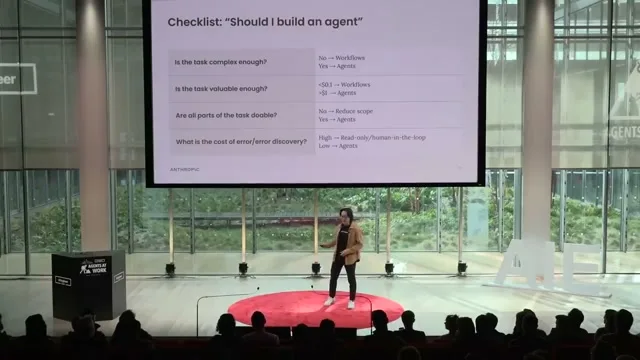
A promising use case still requires testing the **critical capabilities** on which successful execution depends. For a coding agent, those capabilities include writing useful code, debugging, and recovering from errors. A weak link does not necessarily make the entire application impossible, but it can multiply cost and latency across the agent’s trajectory. Zhang recommends reducing the scope, simplifying the task, and trying again when those bottlenecks appear. [3:29](https://www.youtube.com/watch?v=D7_ipDqhtwk&t=209s)
Teams must also assess both the **cost of an error** and the difficulty of discovering it. High-stakes mistakes that are difficult to detect make it harder to trust an agent with independent action. Read-only access and additional human oversight can reduce exposure, but they also restrict the autonomy that makes an agent scalable in the first place. The resulting tradeoff is not simply safety versus capability; it is whether a particular environment supports enough trustworthy autonomy to justify an agent at all. [4:29](https://www.youtube.com/watch?v=D7_ipDqhtwk&t=269s)
Coding illustrates how these requirements can align. Moving from a design document to a pull request is complex and ambiguous, useful code has meaningful value, and Zhang identifies Claude as already capable across multiple parts of the coding workflow. Most importantly, **unit tests and CI** provide concrete mechanisms for checking the output, making errors easier to discover than in domains where results are difficult to verify. [4:29](https://www.youtube.com/watch?v=D7_ipDqhtwk&t=269s)
Evaluate capability, risk, and verifiability together
- Validate essential coding-agent capabilities: writing code, debugging, and recovering from errors.
- When capability bottlenecks multiply cost and latency, narrow the scope and simplify the task.
- Read-only access and human oversight reduce exposure but also constrain autonomy and scalability.
- Unit tests and CI make coding-agent outputs verifiable, improving error discovery.
### Build the smallest useful agent loop
[5:39](https://www.youtube.com/watch?v=D7_ipDqhtwk&t=339s)
Zhang reduces the basic agent architecture to **a model using tools in a loop**. Three elements determine how that loop behaves: the **environment** in which the agent operates, the **tools** through which it acts and receives feedback, and the **system prompt** that defines its goals, constraints, and desired behavior. The model repeatedly interprets its available context, selects actions, observes results, and continues within that framework. [5:39](https://www.youtube.com/watch?v=D7_ipDqhtwk&t=339s)
The practical reason for this minimal architecture is iteration speed. Upfront complexity slows experimentation before the team understands which behaviors actually matter, while improving the environment, tools, and prompt offers a stronger early return. Zhang notes that agent applications can differ substantially in their product experience, scope, and capabilities while sharing almost the same underlying backbone and even nearly identical code. [5:39](https://www.youtube.com/watch?v=D7_ipDqhtwk&t=339s) [6:53](https://www.youtube.com/watch?v=D7_ipDqhtwk&t=413s)
Once the environment is determined by the use case, the principal design choices become which tools to expose and how to instruct the model. Optimization follows after the basic behavior works: coding and computer-use agents may benefit from caching their trajectories to reduce cost, while search agents can parallelize multiple tool calls to reduce latency. Presenting agent progress clearly is another broadly useful improvement because it helps users develop trust in what the system is doing. [6:53](https://www.youtube.com/watch?v=D7_ipDqhtwk&t=413s) [7:46](https://www.youtube.com/watch?v=D7_ipDqhtwk&t=466s)
Build the smallest useful agent loop
- Build agents as models using tools in a loop, defined by their environment, tools, and system prompt.
- Keep initial architecture simple to preserve iteration speed; optimize after the core behavior works.
- Once the environment is fixed, focus on tool selection and system-prompt instructions.
- Cache coding trajectories to reduce cost, parallelize search calls to reduce latency, and show progress to build trust.
### Debug the world from inside the agent’s context
[7:46](https://www.youtube.com/watch?v=D7_ipDqhtwk&t=466s)
Agent behavior can appear sophisticated while still emerging from inference over a limited amount of information at each step. Zhang describes the model’s current understanding of the world as being represented within roughly **10,000 to 20,000 tokens** of context. Developers should inspect that context directly and ask whether it contains enough coherent information to support the decisions they expect the model to make. [7:46](https://www.youtube.com/watch?v=D7_ipDqhtwk&t=466s)
His computer-use example makes this constraint tangible. The agent receives a static screenshot, an inadequate task description, and a set of tools; only actions performed through those tools can change the environment. During inference and tool execution, it lacks continuous visibility into what is happening, and only the next screenshot reveals whether an attempted action succeeded or caused an unexpected change. This stop-and-observe cycle explains why actions that look obvious to a human observer can still be difficult for the agent. [9:01](https://www.youtube.com/watch?v=D7_ipDqhtwk&t=541s)
Looking through that restricted perspective clarifies what additional context is actually useful. A computer-use agent may need the **screen resolution** to choose accurate click coordinates, along with recommended actions, limitations, and guardrails that reduce unnecessary exploration. Rather than adding information indiscriminately, the developer’s task is to identify the specific environmental details and behavioral boundaries that make the next decision more reliable. [10:05](https://www.youtube.com/watch?v=D7_ipDqhtwk&t=605s)
Models can also assist with inspecting their own operating conditions. Zhang describes asking Claude whether a system prompt is ambiguous, whether a tool description is understandable, and whether a tool needs different parameters. His team also submits complete agent trajectories to examine why a particular decision occurred and what information might improve future decisions. This technique supplements, rather than replaces, the developer’s own understanding of the agent’s context. [10:05](https://www.youtube.com/watch?v=D7_ipDqhtwk&t=605s) [11:10](https://www.youtube.com/watch?v=D7_ipDqhtwk&t=670s)
Debug the world from inside the agent’s context
- Inspect the agent’s approximately 10,000–20,000 tokens of context for sufficiency and coherence.
- Computer-use agents act through tools, then depend on the next screenshot to discover what changed.
- Provide actionable context such as screen resolution, recommended actions, limitations, and guardrails.
- Use Claude to inspect ambiguous prompts, tool descriptions, parameters, and complete agent trajectories.
Computer-use feedback loop
The agent discovers each action’s outcome only after receiving another screenshot.
- Static screenshot — Shows the current visible environment.
- Model inference — Interprets the task and selects an action.
- Tool action — Attempts an environmental change.
- Next screenshot — Reveals whether the action succeeded.
- Static screenshot → Model inference (Provides visible context)
- Model inference → Tool action (Attempts a click)
- Tool action → Next screenshot (Outcome becomes visible)
- Next screenshot → Static screenshot (Cycle starts again)
### Treat budgets, adaptive tools, and coordination as open problems
[11:10](https://www.youtube.com/watch?v=D7_ipDqhtwk&t=670s)
One unresolved challenge is making agents more **budget-aware**. Unlike predefined workflows, autonomous systems do not offer the same straightforward control over cost and latency because their execution paths can expand as they explore. Zhang identifies the definition and enforcement of budgets for time, money, and tokens as an open production problem whose resolution could make additional agent applications practical. [11:10](https://www.youtube.com/watch?v=D7_ipDqhtwk&t=670s)
A second direction is **self-evolving tools**. Teams already use models to improve tool descriptions, and Zhang suggests extending that practice into a meta-tool that allows agents to design and refine their own tool ergonomics. He presents this as a possible route toward more general-purpose agents that can adapt their interfaces to the needs of individual use cases, rather than as an established capability or demonstrated result. [12:11](https://www.youtube.com/watch?v=D7_ipDqhtwk&t=731s)
Zhang also anticipates greater use of **multi-agent collaboration**, emphasizing parallelism, separation of concerns, and sub-agents that protect the main agent’s context window. The unresolved question is how such agents should communicate: many existing systems are organized around mostly synchronous user-assistant turns, while richer collaboration may require asynchronous communication and additional roles that let agents recognize and interact with one another. These possibilities remain forward-looking questions, reinforcing the talk’s immediate advice to use agents selectively, keep implementations simple, and iterate from the agent’s perspective. [12:11](https://www.youtube.com/watch?v=D7_ipDqhtwk&t=731s) [13:13](https://www.youtube.com/watch?v=D7_ipDqhtwk&t=793s)
Treat budgets, adaptive tools, and coordination as open problems
- Budget-aware agents need practical ways to define and enforce limits on time, money, and tokens.
- Self-evolving tools could extend model-assisted tool-description improvements into agent-designed tool ergonomics.
- Multi-agent collaboration offers parallelism, separation of concerns, and protection of the main agent’s context window.
- Asynchronous communication and additional agent roles remain open questions for multi-agent coordination.
## Key takeaways
- Use an **agent** when the task is ambiguous, valuable, and difficult to encode as a fixed decision tree; otherwise, a predefined **workflow** typically offers better cost control and predictability. [1:18](https://www.youtube.com/watch?v=D7_ipDqhtwk&t=78s) [2:30](https://www.youtube.com/watch?v=D7_ipDqhtwk&t=150s)
- Evaluate token economics, critical model capabilities, error severity, and error discoverability before granting autonomy; unit tests and CI make coding particularly amenable to verification. [3:29](https://www.youtube.com/watch?v=D7_ipDqhtwk&t=209s) [4:29](https://www.youtube.com/watch?v=D7_ipDqhtwk&t=269s)
- Begin with the minimal agent architecture: an **environment**, a set of **tools**, and a **system prompt**, connected by a model-driven tool-use loop. [5:39](https://www.youtube.com/watch?v=D7_ipDqhtwk&t=339s) [6:53](https://www.youtube.com/watch?v=D7_ipDqhtwk&t=413s)
- Optimize only after the basic behavior works, using techniques such as trajectory caching, parallel tool calls, and progress reporting when they address actual cost, latency, or trust requirements. [6:53](https://www.youtube.com/watch?v=D7_ipDqhtwk&t=413s) [7:46](https://www.youtube.com/watch?v=D7_ipDqhtwk&t=466s)
- Debug from inside the agent’s limited context window, supplying missing environmental details and examining prompts, tool descriptions, and complete trajectories to understand unexpected decisions. [7:46](https://www.youtube.com/watch?v=D7_ipDqhtwk&t=466s) [9:01](https://www.youtube.com/watch?v=D7_ipDqhtwk&t=541s) [10:05](https://www.youtube.com/watch?v=D7_ipDqhtwk&t=605s) [11:10](https://www.youtube.com/watch?v=D7_ipDqhtwk&t=670s)
- Treat **budget-aware execution**, **self-evolving tools**, and **asynchronous multi-agent communication** as open engineering questions rather than solved production capabilities. [11:10](https://www.youtube.com/watch?v=D7_ipDqhtwk&t=670s) [12:11](https://www.youtube.com/watch?v=D7_ipDqhtwk&t=731s) [13:13](https://www.youtube.com/watch?v=D7_ipDqhtwk&t=793s)
## Slides
### Why I am here today
Barry Zhang introduces the talk as a deeper look at three ideas from the article he wrote with Erik Schluntz. The article emphasizes simple, composable patterns over complex frameworks for building agents.
[0:30](https://www.youtube.com/watch?v=D7_ipDqhtwk&t=30s) [The Building effective agents article alongside portraits of Erik Schluntz and Barry Zhang.](https://assets.ai.engineer/sites/aiecode2025/sha256/012efffeac997a5e37370cbf2cf71979062269a712bf8815a4601fc58bc7095e.webp)
Why I am here today
Product
Building effective agents
Dec 19, 2024
Over the past year, we've worked with dozens of teams building large language model (LLM) agents across industries. Consistently, the most successful implementations weren't using complex frameworks or specialized libraries. Instead, they were building with simple, composable patterns.
In this post, we share what we’ve learned from working with our customers and building agents ourselves, and give practical advice for developers on building effective agents.
Erik Schluntz
Barry Zhang
ANTHROPIC
2
### Core Ideas
The talk develops three ideas from the blog post: use agents selectively, keep things simple, and think like your agents.
[0:52](https://www.youtube.com/watch?v=D7_ipDqhtwk&t=52s) [Three ideas: don't build agents for everything, keep it simple, and think like your agents.](https://assets.ai.engineer/sites/aiecode2025/sha256/c90946bd9f1f7203e6e6534fb51a29a0cfa5b1aeaee5612c5af012c7a1249f8c.webp)
Core Ideas
• Don’t build agents for everything
• Keep it simple
• Think like your agents
3
AIE
AGENT ENGINEERING
HTTPS://AI.ENGINEER
### Quick Recap
Single-LLM features use one model call; workflows orchestrate calls in predefined flows; agents decide their own trajectories. The slide places them along a spectrum of increasing agency, capability, cost, latency and consequences.
[1:04](https://www.youtube.com/watch?v=D7_ipDqhtwk&t=64s) [A progression from single-LLM features to workflows and agents, with diagrams and increasing agency, capability, cost, latency and consequences.](https://assets.ai.engineer/sites/aiecode2025/sha256/3a25551bf3845aa8102409a1d20e4490312f36e7887ebddad5f28c7c9cc4be98.webp)
Quick Recap
Single-LLM Features
Summarization, classification, extraction, ...
Workflows
LLMs orchestrated by code
Agents
LLMs deciding their own trajectories
?
Agency ↑
Capability ↑
Cost/Latency/Consequences ↑
Single-LLM diagram: In → LLM → Out
Workflow diagram: In → LLM Call 1 / LLM Call 2 / LLM Call 3 → Aggregator → Out
Agent diagram: Human ↔ LLM Call; LLM Call → Environment (Action); Environment → LLM Call (Feedback); LLM Call → Stop
ANTHROPIC
4
### Quick Recap
Code orchestrates workflows; agents choose their own trajectories using environmental feedback. More agency can increase capability, but also cost, latency and the consequences of errors.
[1:46](https://www.youtube.com/watch?v=D7_ipDqhtwk&t=106s) [The recap slide compares single-LLM features, workflows and agents; the presenter appears in an inset.](https://assets.ai.engineer/sites/aiecode2025/sha256/c28fb4b8e9bcbca149c3b0e2c9395a80753780f67091cab65f3963902443cd42.webp)
Quick Recap
Single-LLM Features
Summarization, classification, extraction, ...
In → LLM → Out
Workflows
LLMs orchestrated by code
In → LLM Call 1 / LLM Call 2 / LLM Call 3 → Aggregator → Out
Agents
LLMs deciding their own trajectories
Human ↔ LLM Call
LLM Call → Action → Environment
Environment → Feedback → LLM Call
LLM Call → Stop
?
Agency↑
Capability ↑
Cost/Latency/Consequences↑
4
AIE
AGENT ENGINEERING
HTTPS://AI.ENGINEER
[1:55](https://www.youtube.com/watch?v=D7_ipDqhtwk&t=115s) [A progression from single-LLM features through workflows and agents, with increasing agency, capability, cost, latency, and consequences.](https://assets.ai.engineer/sites/aiecode2025/sha256/a8e7b24190fbd9aa1b4b40116452ed20247c34a49f2f3b712122a337a8e655e0.webp)
Quick Recap
Single-LLM Features
Summarization, classification, extraction, ...
In → LLM → Out
Workflows
LLMs orchestrated by code
In → LLM Call 1 / LLM Call 2 / LLM Call 3 → Aggregator → Out
Agents
LLMs deciding their own trajectories
Human ↔ LLM Call
LLM Call → Action → Environment
Environment → Feedback → LLM Call
LLM Call → Stop
?
Agency↑
Capability ↑
Cost/Latency/Consequences↑
4
AIE
AGENT ENGINEERING
HTTPS://AI.ENGINEER
### Checklist: “Should I build an agent”
Use workflows for easily mapped, low-value tasks; consider agents when tasks are complex, valuable and feasible. Reduce scope around bottlenecks, and use read-only access or human review when errors or their discovery are costly.
[2:58](https://www.youtube.com/watch?v=D7_ipDqhtwk&t=178s) [Checklist considers task complexity, value, feasibility, and the cost of errors when choosing workflows or agents.](https://assets.ai.engineer/sites/aiecode2025/sha256/38c1402f1070ccdf17e1dc1fd56a1a3b15658f3e43a98f07392bca722d4b10e7.webp)
Checklist: “Should I build an agent”
Is the task complex enough?
No → Workflows
Yes → Agents
Is the task valuable enough?
<$0.1 → Workflows
>$1 → Agents
Are all parts of the task doable?
No → Reduce scope
Yes → Agents
What is the cost of error/error discovery?
High → Read-only/human-in-the-loop
Low → Agents
ANTHROPIC
7
[3:37](https://www.youtube.com/watch?v=D7_ipDqhtwk&t=217s) [Checklist comparing workflows and agents by task complexity, value, feasibility, and cost of errors.](https://assets.ai.engineer/sites/aiecode2025/sha256/623a7e8ae07224a09e6c4dffb1de78256dfc5dcb07cabf98bc11b613a03595d8.webp)
Checklist: “Should I build an agent”
Is the task complex enough?
No → Workflows
Yes → Agents
Is the task valuable enough?
<$0.1 → Workflows
>$1 → Agents
Are all parts of the task doable?
No → Reduce scope
Yes → Agents
What is the cost of error/error discovery?
High → Read-only/human-in-the-loop
Low → Agents
7
Interface text:
AIE
AGENT ENGINEERING
HTTPS://AI.ENGINEER
### Why is coding a great agent use case
Coding combines an ambiguous, valuable task—from design doc to PR—with a capable model. Unit tests and CI help verify the result.
[4:59](https://www.youtube.com/watch?v=D7_ipDqhtwk&t=299s) [Coding is presented as a strong agent use case because of its complexity, value, viability, and verification through unit tests and CI.](https://assets.ai.engineer/sites/aiecode2025/sha256/ef9399a82831614ac702c06573b9e2eab11d1ee41450a69c62192eda05aab635.webp)
Why is coding a great agent use case
1. Complexity: design-doc to PR ✓
2. Value: $$$ ✓
3. Viability: Claude is great at coding ✓
4. Cost of error: Unit-tests + CI ✓
ANTHROPIC
8
[5:27](https://www.youtube.com/watch?v=D7_ipDqhtwk&t=327s) [Slide lists complexity, value, viability, and verification through unit tests and CI as reasons coding suits agents.](https://assets.ai.engineer/sites/aiecode2025/sha256/6f6a0cc4561c57af308a9e9143fa1867c58ae11f7a030fd21b4b77edb6b6b534.webp)
Why is coding a great agent use case
1. Complexity: design-doc to PR ✓
2. Value: $$$ ✓
3. Viability: Claude is great at coding ✓
4. Cost of error: Unit-tests + CI ✓
8
Interface text:
AIE
AGENT ENGINEERING
HTTPS://AI.ENGINEER
### Agents are models using tools in a loop
The model uses the system prompt and environment state to choose an action. Tools run that action and update the environment, feeding the next pass through the loop.
[6:10](https://www.youtube.com/watch?v=D7_ipDqhtwk&t=370s) [Pseudocode shows an agent using tools in a loop, with environment, tools, and system prompt highlighted.](https://assets.ai.engineer/sites/aiecode2025/sha256/255010cd9a520383282470db15cfc74cc44b446f42f003e3f37544e31040fe03.webp)
Agents are models using tools in a loop
env = Environment()
tools = Tools(env)
system_prompt = "Goals, constraints, and how to act"
while True:
action = llm.run(system_prompt + env.state)
env.state = tools.run(action)
10
AIE
AGENT ENGINEERING
HTTPS://AI.ENGINEER
### Making it more concrete
Coding, computer-use and search agents share a backbone, while their environments, tools and system prompts vary by use case.
[6:42](https://www.youtube.com/watch?v=D7_ipDqhtwk&t=402s) [Table compares environments, tools, and system prompts for coding, computer use, and search agents.](https://assets.ai.engineer/sites/aiecode2025/sha256/f47bd671853c26c81852fa42cdd2d30601867c71329c08a2a93abaeb00b831b4.webp)
Making it more concrete
Environment | Tools | System Prompt
Coding | > _ | bash, grep, read, write, ... | “You are an interactive coding assistant...”
Computer use | Click, type, screenshot, ... | “You are utilising an Ubuntu virtual machine with internet access...”
Search | Search_web, search_local, fetch... | “You are a search assistant...”
ANTHROPIC
11
[6:57](https://www.youtube.com/watch?v=D7_ipDqhtwk&t=417s) [Table comparing environments, tools, and system prompts for coding, computer use, and search agents.](https://assets.ai.engineer/sites/aiecode2025/sha256/3f8ad8de1d37497ffec4c678e6c9b07f9b05a4bff6a78bbf5029e1d3bc3ad960.webp)
Making it more concrete
Environment | Tools | System Prompt
Coding | > _ | bash, grep, read, write, ... | “You are an interactive coding assistant...”
Computer use | Click, type, screenshot, ... | “You are utilising an Ubuntu virtual machine with internet access...”
Search | Search_web, search_local, fetch... | “You are a search assistant...”
11
Interface text:
AIE
AGENT ENGINEERING
HTTPS://AI.ENGINEER
### Think like your agents
Builders can find agent mistakes confusing when they reason from their own perspective. The speaker recommends considering the agent’s context window.
[8:01](https://www.youtube.com/watch?v=D7_ipDqhtwk&t=481s) [Section slide reading “Idea 3: Think like your agents.”](https://assets.ai.engineer/sites/aiecode2025/sha256/73ffd0ed3b4417b3c684e6ecef88571593c7da1d6d34c4f0e1dec38fbfe8e0c2.webp)
Idea 3:
Think like your agents
12
AIE
AGENT ENGINEERING
HTTPS://AI.ENGINEER
### Put yourself in their context window
An agent acts on its environment and receives feedback, but each LLM call sees only its supplied context: instructions, tools, and interaction history. Check whether that context is sufficient and coherent.
[8:21](https://www.youtube.com/watch?v=D7_ipDqhtwk&t=501s) [A diagram connects a human and an LLM call, with an action and feedback loop between the LLM and its environment and a path to stop.](https://assets.ai.engineer/sites/aiecode2025/sha256/871da967f11bb4fda2021e4371fe9af154b08ef9e2a58d382ce4341a5761cf17.webp)
Put yourself in their shoes (struck through) context window
Human ↔ LLM Call
LLM Call → Environment: Action
Environment → LLM Call: Feedback
LLM Call → Stop
ANTHROPIC
13
[8:30](https://www.youtube.com/watch?v=D7_ipDqhtwk&t=510s) [An agent action-and-feedback loop beside an example input containing instructions, tools, and interaction history.](https://assets.ai.engineer/sites/aiecode2025/sha256/556ffa4d4647f5a713ab617d399b77760dc7da5d048d2c9d592c6610e15fa845.webp)
Put yourself in their shoes (struck through) context window
Human ↔ LLM Call
LLM Call → Environment: Action
Environment → LLM Call: Feedback
LLM Call → Stop
Input:
You are a coding assistant...
You have the following tools...
User: Help me resolve all test failures
Assistant Tool use: read_file test.py
Tool response: content of test.py: ...
ANTHROPIC
13
### What it’s like as a computer use agent
The agent starts with a screenshot and a task, then moves and clicks without seeing the result until the next screenshot. The slide compares the wait to closing your eyes for 3–5 seconds; the next image shows Chrome open.
[9:05](https://www.youtube.com/watch?v=D7_ipDqhtwk&t=545s) [An Ubuntu desktop screenshot and a prompt describing a computer-use agent tasked with installing a music app and signing in.](https://assets.ai.engineer/sites/aiecode2025/sha256/1acf8b3493ba17788a09a832ebadd72092946b82cbdd138ee5f1b5152d90c6e3.webp)
What it’s like as a computer use agent
“You are a computer use agent.
You can move your mouse, click, type and use keys.
Your task:
Install spotify and login as Barry”
ANTHROPIC
14
[9:43](https://www.youtube.com/watch?v=D7_ipDqhtwk&t=583s) [A computer-use agent moves and clicks, waits for a screenshot, and sees a browser open with updated task context.](https://assets.ai.engineer/sites/aiecode2025/sha256/61790de282b346cc6ced20e4f7d17cfecdb024c9dccf96d1bc1968c82e69aa1e.webp)
What it’s like as a computer use agent
“You are a computer use agent.
You can move your mouse, click, type and use keys.
Your task:
Install spotify and login as Barry”
Tool: Move(48, 53)
Tool: Click()
Close your eyes for 3–5 seconds
“You are a computer use agent.
You can move your mouse, click, type and use keys.
Your task:
Install spotify and login as Barry
You moved and clicked”
14
Interface text:
Google
Can’t update Chrome
Reinstall Chrome
Restore
AIE
AGENT ENGINEERING
HTTPS://AI.ENGINEER
### What would you have needed?
Screen resolution helps a computer-use agent choose where to click. Recommended actions and limitations can narrow its exploration, such as installing through the terminal and avoiding reCAPTCHA.
[10:05](https://www.youtube.com/watch?v=D7_ipDqhtwk&t=605s) [Three columns describe screen resolution and screenshot timing, installing applications through a terminal, and a reCAPTCHA limitation.](https://assets.ai.engineer/sites/aiecode2025/sha256/d7ff29e5f8c63925d216f4d204218e593e676f36b625b13d19e126816db33925.webp)
What would you have needed?
Environment context
• “The screen resolution is 1024x768”
• “You will receive a screenshot every 3-5 seconds”
Recommended actions
• “You can and should install applications via terminal”
Limitations
• “You cannot solve reCAPTCHA”
15
Interface text:
AIE
AGENT ENGINEERING
HTTPS://AI.ENGINEER
### Personal Musings and Open Questions
Budget awareness could give production deployments control over cost and latency. The speaker also asks whether agents can improve their own tools and communicate beyond synchronous user-assistant turns.
[11:44](https://www.youtube.com/watch?v=D7_ipDqhtwk&t=704s) [Slide raises questions about agent budgets, self-evolving tools, and communication among agents.](https://assets.ai.engineer/sites/aiecode2025/sha256/f44d6f7263fb18cd6a415122e372dcac4390eaaec25a9d49e272298c6dd0758d.webp)
Personal Musings
And open questions
Agents need budget-awareness:
How do we explain and enforce 5 mins/$10/2M tokens budgets?
Tools should be self-evolving:
How can models improve their own tool ergonomics?
Multi-agents need new ways of communicating:
How to expand from synchronous USER:ASSISTANT turns?
ANTHROPIC
18
[12:36](https://www.youtube.com/watch?v=D7_ipDqhtwk&t=756s) [Slide presents open questions about agent budgets, self-evolving tools, and multi-agent communication.](https://assets.ai.engineer/sites/aiecode2025/sha256/1afe7c7a54fda3577e76a3a36076155b5ce2a34d0ca4afc61a1270efcc829b11.webp)
Personal Musings
And open questions
Agents need budget-awareness:
How do we explain and enforce 5 mins/$10/2M tokens budgets?
Tools should be self-evolving:
How can models improve their own tool ergonomics?
Multi-agents need new ways of communicating:
How to expand from synchronous USER:ASSISTANT turns?
18
Interface text:
AIE
AGENT ENGINEERING
HTTPS://AI.ENGINEER
### Core Ideas
Choose agent use cases carefully. When an agent is warranted, keep it simple for as long as possible and, as you iterate, take its perspective to help it do its job.
[13:44](https://www.youtube.com/watch?v=D7_ipDqhtwk&t=824s) [Three takeaways: do not build agents for everything, keep it simple, and think like your agents.](https://assets.ai.engineer/sites/aiecode2025/sha256/a9c7ffbccf2dc6353e534f69324c38157993b68dce2a62b1262fbb9d95908d66.webp)
Core Ideas
• Don’t build agents for everything
• Keep it simple
• Think like your agents
ANTHROPIC
19
### Keep in Touch
Barry Zhang closes with the story of choosing “AI Engineer” as his Meta job title in 2023 after reading a swyx blog post about making AI useful.
[14:14](https://www.youtube.com/watch?v=D7_ipDqhtwk&t=854s) [Closing slide with the speaker’s social accounts and an anecdote about an AI engineer job title.](https://assets.ai.engineer/sites/aiecode2025/sha256/ff348b096b83c3f0b4aaa279e2f048bbdfc07c023e40d71d2b46f2dd0298610b.webp)
Keep in Touch :D
Linkedin: @barry-z
X: @barry_zyj
The first “AI Engineer” at Meta :P
ANTHROPIC
20
Interface text:
Search by Name
Clear filters
Location
Department
AI Engineer
Any field
More filters
Name
Job title & department
Location & phone
Skills
Barry Zhang
AI Engineer
Gen AI ENG Team
New York
[redacted]
## Full transcript
[0:00](https://www.youtube.com/watch?v=D7_ipDqhtwk&t=0s) [on-hold music] Wow, it's, uh, incredible t-to be on the same stage as, uh, so many people I've learned so much from.
[0:22](https://www.youtube.com/watch?v=D7_ipDqhtwk&t=22s) Let's get into it. My name is Barry, and today, we're gonna be talking about how we build effective agents.
[0:29](https://www.youtube.com/watch?v=D7_ipDqhtwk&t=29s) About two months ago, Erik and I wrote a blog post called Building effective agents. In there, we shared some opinionated take on what an agent is and isn't, and we give some practical learnings that we have gained along the way.
[0:42](https://www.youtube.com/watch?v=D7_ipDqhtwk&t=42s) Today, I'd like to go deeper on three core ideas from the blog post and provide you with some personal musings at the end.
[0:51](https://www.youtube.com/watch?v=D7_ipDqhtwk&t=51s) Here are those ideas. First, don't build agents for everything. Second, keep it simple. And third, think like your agents.
[1:02](https://www.youtube.com/watch?v=D7_ipDqhtwk&t=62s) Let's first start with a recap of how we got here. Most of us probably started building very simple features, things like summarization, classification, extraction, just really simple things that felt like magic two to three years ago and have now become table stakes.
[1:18](https://www.youtube.com/watch?v=D7_ipDqhtwk&t=78s) Then, as we got more sophisticated and as products mature, we got more creative. One model call often wasn't enough. So we started orchestrating multiple model calls in predefined control flows.
[1:31](https://www.youtube.com/watch?v=D7_ipDqhtwk&t=91s) This basically gave us a way to trade off cost and latency for better performance, and we call these workflows.
[1:39](https://www.youtube.com/watch?v=D7_ipDqhtwk&t=99s) We believe this is the beginning of agentic systems.
[1:43](https://www.youtube.com/watch?v=D7_ipDqhtwk&t=103s) Now, models are even more capable, and we're seeing more and more domain spec-- uh, uh, domain-specific agents start to pop up in production. Unlike workflows, agents can decide their own trajectory and operate almost in-independently based on environment feedback.
[1:59](https://www.youtube.com/watch?v=D7_ipDqhtwk&t=119s) This is gonna be our focus today. It's probably a little bit too early to name what the next phase of agentic system is gonna look like, especially in production.
[2:08](https://www.youtube.com/watch?v=D7_ipDqhtwk&t=128s) Single agents could become a lot more general-purpose and more capable, or we can start to see collaboration and delegation in multi-agent settings.
[2:16](https://www.youtube.com/watch?v=D7_ipDqhtwk&t=136s) Regardless, I think the broad trend here is that as we give these systems a lot more agency, they become more useful and more capable, but as a result, the cost, the latency, the consequences of errors also go up.
[2:30](https://www.youtube.com/watch?v=D7_ipDqhtwk&t=150s) And that brings us to the first point: Don't build agents for everything.
[2:35](https://www.youtube.com/watch?v=D7_ipDqhtwk&t=155s) Well, why not? We think of agents as a way to scale complex and valuable tasks. They shouldn't be a drop-in upgrade for every use case. If, uh, if you have read the blog post, you'll know that we talked a lot about workflows, and that's because we really like them, and they're a great concrete way to deliver values
[2:54](https://www.youtube.com/watch?v=D7_ipDqhtwk&t=174s) today. Well, so when should you build an agent?
[2:58](https://www.youtube.com/watch?v=D7_ipDqhtwk&t=178s) Here's our checklist. The first thing to consider is the complexity of your task. Agents really thrive in ambiguous problem spaces, and if you can map out the entire decision tree pretty easily, just build that explicitly and then optimize every node of that decision tree.
[3:15](https://www.youtube.com/watch?v=D7_ipDqhtwk&t=195s) It's a lot more cost-effective, and it's gonna give you a lot more control.
[3:20](https://www.youtube.com/watch?v=D7_ipDqhtwk&t=200s) Next thing to consider is the value of your task. That exploration I just mentioned is gonna cost you a lot of tokens, so the task really needs to justify the cost.
[3:29](https://www.youtube.com/watch?v=D7_ipDqhtwk&t=209s) If your budget per, uh, per task is around ten cents, for example, you're building a, um, high-volume customer support system, that only affords you thirty to fifty thousand tokens.
[3:40](https://www.youtube.com/watch?v=D7_ipDqhtwk&t=220s) In that case, just use a workflow to solve the most common scenarios, and you're able to capture the majority of the values from there.
[3:47](https://www.youtube.com/watch?v=D7_ipDqhtwk&t=227s) On the other hand, though, if you look at this question and your first thought is, "I don't care how many tokens I spend. I just wanna get the task done," please see me after the talk.
[3:56](https://www.youtube.com/watch?v=D7_ipDqhtwk&t=236s) Our go-to-market team would love to speak with you. [laughing]
[4:00](https://www.youtube.com/watch?v=D7_ipDqhtwk&t=240s) From there, we wanna de-risk the critical capabilities. This is to make sure that there aren't any significant bottlenecks in the agent's trajectory. If you're doing a coding agent, you wanna make sure it's able to write good code, it's able to debug, and it's able to recover from its errors.
[4:16](https://www.youtube.com/watch?v=D7_ipDqhtwk&t=256s) If you do have bottlenecks, that's probably not gonna be fatal, but they will multiply your cost and latency. So in that case, we normally just reduce the scope, simplify the task, and try again.
[4:29](https://www.youtube.com/watch?v=D7_ipDqhtwk&t=269s) Finally, the, the, the last important thing to consider is the cost of error and error discovery. If your errors are gonna be high stake and very hard to discover, it's gonna be very difficult for you to trust the agent to take actions on your behalf and to have more autonomy.
[4:45](https://www.youtube.com/watch?v=D7_ipDqhtwk&t=285s) You can always mitigate this by limiting the scope, right? You can have read-only access. You can have more human in the loop, but this will also limit how well you're able to scale your agent in your use case.
[4:58](https://www.youtube.com/watch?v=D7_ipDqhtwk&t=298s) Let's see this checklist in, in action. Why is coding a great agent use case? First, to go from design doc to a PR is obviously a very ambiguous and very complex task.
[5:09](https://www.youtube.com/watch?v=D7_ipDqhtwk&t=309s) And second, um, we're-- a lot of us are developers here, so we know that good code has a lot of value.
[5:16](https://www.youtube.com/watch?v=D7_ipDqhtwk&t=316s) And third, many of us already use Claude for coding, so we know that it's great at many parts of the coding workflow. And last, coding has this really nice property where the output is easily verifiable through unit tests and CI.
[5:31](https://www.youtube.com/watch?v=D7_ipDqhtwk&t=331s) And that's probably why we're seeing so many creative and successful coding agents right now.
[5:39](https://www.youtube.com/watch?v=D7_ipDqhtwk&t=339s) Once you find a good use case for agents, this is the second core idea, which is to keep it as simple as possible.
[5:47](https://www.youtube.com/watch?v=D7_ipDqhtwk&t=347s) Let me show you what I mean. This is what agents look like to us. They're models using tools in a loop. And in this frame, three components define what an agent really looks like.
[6:00](https://www.youtube.com/watch?v=D7_ipDqhtwk&t=360s) First is the environment. This is the system that the agent is operating in.
[6:05](https://www.youtube.com/watch?v=D7_ipDqhtwk&t=365s) Then we have a set of tools which offer an interface for the agent to take action and get feedback.
[6:12](https://www.youtube.com/watch?v=D7_ipDqhtwk&t=372s) Then we have the system prompt, which defines the goals, the constraints, and the ideal behavior for the agent to actually work in this environment. Then the model gets called in a loop, and that's agents.
[6:26](https://www.youtube.com/watch?v=D7_ipDqhtwk&t=386s) We have learned the hard way to keep this simple because any complexity up front is really gonna kill iteration speed. Iterating on just these three basic components is gonna give you by far the highest ROI, and optimizations can come later.
[6:42](https://www.youtube.com/watch?v=D7_ipDqhtwk&t=402s) Here are examples of three agent use cases that we have built for ourselves or, or our customers just to make it more concrete. They're gonna look very different on the product surface, they're gonna look very different in their scope, they're gonna look different in their capability, but they share almost exactly the same backbone.
[6:58](https://www.youtube.com/watch?v=D7_ipDqhtwk&t=418s) They o- they, they actually share almost the exact same code.
[7:02](https://www.youtube.com/watch?v=D7_ipDqhtwk&t=422s) The environment largely depends on your use case, so really, the only two design decisions is what are the set of tools you wanna offer to the agent and what is the prompt that you want to instruct your agent to follow?
[7:16](https://www.youtube.com/watch?v=D7_ipDqhtwk&t=436s) Um, on this note, if you wanna learn more about tools, my friend Mahesh is gonna be giving a workshop on Model Context Protocol, MCP, tomorrow morning. Um, I've seen that workshop.
[7:24](https://www.youtube.com/watch?v=D7_ipDqhtwk&t=444s) It's gonna be really fun, so I highly encourage you guys to, to check that out. Um, but back to our talk. Once you have figured out these three basic components, you have a lot of optimization to do from there.
[7:35](https://www.youtube.com/watch?v=D7_ipDqhtwk&t=455s) Uh, for coding and computer use, uh, you might want to, uh, cache the trajectory to reduce cost. For search, where you have a lot of tool calls, you can parallelize a lot of those to reduce latency.
[7:46](https://www.youtube.com/watch?v=D7_ipDqhtwk&t=466s) And for almost all of these, we wanna make sure to present the agent's progress in such a way that gain user trust. But that's it. Keep it as simple as possible as you're iterating, build these three components first, and then optimize once you have the behaviors down.
[8:04](https://www.youtube.com/watch?v=D7_ipDqhtwk&t=484s) All right, this is the last idea, um, is to think like your agents. I've seen a lot of builders, and myself included, who develop agents from our own perspectives and get confused when agents make a mistake.
[8:17](https://www.youtube.com/watch?v=D7_ipDqhtwk&t=497s) It seems counterintuitive to us. And that's why we always recommend to put yourself in the agent's context window.
[8:25](https://www.youtube.com/watch?v=D7_ipDqhtwk&t=505s) Agents can exhibit some really sophisticated behavior. It can look incredibly con- uh, complex. But at each step, what the model is doing is still just running inference on a very limited set of context.
[8:37](https://www.youtube.com/watch?v=D7_ipDqhtwk&t=517s) Everything that the model knows about the current state of the world is gonna be explained in that ten to twenty k tokens, and it's really helpful to limit ourselves in that context and see if it's actually sufficient and coherent.
[8:51](https://www.youtube.com/watch?v=D7_ipDqhtwk&t=531s) This will give you a much better understanding of how agents see the world and then kinda bridge the gap between our understanding and theirs.
[9:01](https://www.youtube.com/watch?v=D7_ipDqhtwk&t=541s) Let's imagine for a second that we're computer-use agents now, and let's see what that feels like. All we're gonna get is a static screenshot and a very poorly written description.
[9:11](https://www.youtube.com/watch?v=D7_ipDqhtwk&t=551s) It's by yours truly. Let's read through it. You know, you're a computer-use agent, you have a set of tools, and you have a task. Terrible. Uh, we can think and talk and reason all we want, but the only thing that's gonna take effect in the environment are our tools.
[9:26](https://www.youtube.com/watch?v=D7_ipDqhtwk&t=566s) So we attempt a click without really seeing what's happening, and while the inference is happening, while the tool execution is happening, this is basically equivalent to us closing our eyes for three to five seconds and using the computer in the dark.
[9:40](https://www.youtube.com/watch?v=D7_ipDqhtwk&t=580s) Then you open up your eyes and you see another screenshot. Whatever you did could have worked or you could have shut down the computer. You just don't know. This is a huge leap of faith, and the cycle kinda starts again.
[9:52](https://www.youtube.com/watch?v=D7_ipDqhtwk&t=592s) I highly re- recommend just trying, try doing a full task from the agent's pers- perspective like this. I promise you, it's a fascinating and only mildly uncomfortable experience. [laughing]
[10:05](https://www.youtube.com/watch?v=D7_ipDqhtwk&t=605s) However, once you go through that mildly uncomfortable experience, uh, I think it becomes very clear what the agents would have actually needed. It's clearly very crucial to know, uh, what the screen resolution is, so I know how to click.
[10:17](https://www.youtube.com/watch?v=D7_ipDqhtwk&t=617s) Um, it's also good to have recommended actions and limitations just so that, you know, uh, we can, uh, put some guardrails around, uh, what we should be e- exploring, and we can avoid unnecessary exploration.
[10:29](https://www.youtube.com/watch?v=D7_ipDqhtwk&t=629s) These are just some examples and, you know, do this exercise for your own, own agent use case and figure out what kind of context do you actually want to provide for the agent.
[10:39](https://www.youtube.com/watch?v=D7_ipDqhtwk&t=639s) Fortunately, though, um, we are building systems that speak our language, so we could just ask Claude to understand Claude. You can throw in your, your system prompt and ask, "Well, is any of this instruction ambiguous?
[10:51](https://www.youtube.com/watch?v=D7_ipDqhtwk&t=651s) Does it make sense to you? Are you able to follow this?" You can throw in a tool description and see whether the agent knows how to use the tool.
[10:58](https://www.youtube.com/watch?v=D7_ipDqhtwk&t=658s) You can see if it wants more parameter, fewer parameter. And one thing that we do quite frequently is we throw the entire agent's trajectory into Claude and just ask it, "Hey, why do you think we made this decision right here?
[11:10](https://www.youtube.com/watch?v=D7_ipDqhtwk&t=670s) And is there anything that we can do to help you make better decisions?"
[11:14](https://www.youtube.com/watch?v=D7_ipDqhtwk&t=674s) This shouldn't replace your own understanding of the context, but it will help you gain a much closer perspective on how the agent is seeing the world. So once again, think like your agent as you're iterating.
[11:27](https://www.youtube.com/watch?v=D7_ipDqhtwk&t=687s) All right, uh, I've sp-- I, I've spent most of the talk talking about very practical stuff. Uh, I'm gonna indulge myself and spend one slide on personal musings. This is gonna be my view on how this might evolve and some open questions I think we need to answer together as AI engineers.
[11:43](https://www.youtube.com/watch?v=D7_ipDqhtwk&t=703s) These are the top three things that are always on my mind. First, I think we need to make agents a lot more budget aware. Unlike workflows, we don't really have a great sense of control for the cost and latency for agents.
[11:55](https://www.youtube.com/watch?v=D7_ipDqhtwk&t=715s) I think figuring this out will enable a lot more use cases, as it gives us the necessary control to deploy them in production. The open question is just what's the best way to define and enforce budgets in terms of time, in terms of money, in terms of tokens, the things that we care about?
[12:12](https://www.youtube.com/watch?v=D7_ipDqhtwk&t=732s) Next up is this concept of self-evolving tools. I've re- I, I've already hinted at this two slides ago, but, uh, we are already using models to help iterate on the tool description.
[12:22](https://www.youtube.com/watch?v=D7_ipDqhtwk&t=742s) But this should generalize pretty well into a meta tool where agents can design and improve their own tool ergonomics.
[12:29](https://www.youtube.com/watch?v=D7_ipDqhtwk&t=749s) This will make agents a lot more general purpose as they can, uh, uh, adopt the tools that they need for each use case.
[12:37](https://www.youtube.com/watch?v=D7_ipDqhtwk&t=757s) Finally, um, I don't even think this is a hot take anymore. I have a personal conviction that we'll see a lot more multi-agent, uh, collaborations in production by the end of this year.
[12:46](https://www.youtube.com/watch?v=D7_ipDqhtwk&t=766s) They're well parallelized, they have very nice separation of concerns, and having sub-agent, for example, will really protect the main agent's context window.
[12:57](https://www.youtube.com/watch?v=D7_ipDqhtwk&t=777s) Um, but I think a big open question here is, um, how, how do these agents actually communicate with each other? We're currently in this very rigid frame of having mostly synchronous user-assistant turns, and I think most of our systems are built around that.
[13:13](https://www.youtube.com/watch?v=D7_ipDqhtwk&t=793s) So how do we expand from there and build an asynchronous communication and bu- uh, and enable more roles that, that afford agents to communicate with each other and recognize each other?
[13:21](https://www.youtube.com/watch?v=D7_ipDqhtwk&t=801s) I think that's gonna be a big open question as we explore this more multi-agent future.
[13:27](https://www.youtube.com/watch?v=D7_ipDqhtwk&t=807s) These are the areas that take up a lot of my mind space. If you're also thinking about this, uh, please shoot me a text. I would love to chat.
[13:37](https://www.youtube.com/watch?v=D7_ipDqhtwk&t=817s) Okay. Let's, uh, bring it all together. If you forget everything I said today, these are the three takeaways. First, don't build agents for everything. If you do find a good use case and want to build an agent, keep it as simple for as long as possible.
[13:51](https://www.youtube.com/watch?v=D7_ipDqhtwk&t=831s) And finally, as you iterate, try to think like your agent, gain their perspective, and help them do their job.
[14:00](https://www.youtube.com/watch?v=D7_ipDqhtwk&t=840s) I would love to keep in touch with every one of you. If you wanna chat about agents, especially those open questions that I talked about, uh, you'll be incredibly lovely if you can just, you know, uh, jam, uh, on some of these ideas.
[14:12](https://www.youtube.com/watch?v=D7_ipDqhtwk&t=852s) Uh, these are my socials if you wanna get connected, and I'm gonna end the presentation on a personal anecdote. So back in 2023, I was building AI product at Meta, and we had this funny thing where we could change our job description to anything we want.
[14:25](https://www.youtube.com/watch?v=D7_ipDqhtwk&t=865s) Um, after reading that blog post from swyx, I decided I was gonna be the first AI engineer. Um, I, I really loved the focus on practicality and just making AI actually useful to the world, and I think that aspiration brought me here today.
[14:40](https://www.youtube.com/watch?v=D7_ipDqhtwk&t=880s) So I hope you enjoy the rest of the AI Engineer Summit and in the meantime, let's keep building. Thank you. [clapping] [outro music]